
Workflow automation tools connect the apps you already use, such as Gmail, Google Sheets, your CRM, your shop or Slack, so that work moves between them without copy and paste. When a form is submitted, add a row; when an invoice is paid, update the customer; when a lead arrives, notify sales.
There are dozens of these tools, but most small and mid-sized teams end up choosing between four: Zapier, Make, n8n and Microsoft Power Automate. This guide compares them on what actually matters: how they charge, how hard they are to use, and which kind of team each suits.
Key takeaways
- Zapier is the easiest and has the most app integrations, but it gets expensive as workflows grow.
- Make is cheaper per unit and better for complex, branching workflows, with a visual builder.
- n8n is the cheapest at scale if you self-host it, and the most flexible for technical teams.
- Power Automate makes the most sense if your company already runs on Microsoft 365.
- How a tool counts usage matters more than its headline price. Model your real workflows before choosing.
Quick comparison
| Zapier | Make | n8n | Power Automate | |
|---|---|---|---|---|
| Free plan | 100 tasks a month | 1,000 credits a month, 2 active scenarios | Free if self-hosted; Cloud has a trial only | Standard cloud flows included with many Microsoft 365 plans |
| Entry paid plan | About $20/month (750 tasks) | About $9–11/month (10,000 credits) | Cloud Starter about $24/month | Premium about $15/user/month |
| Usage counted by | Task (each action) | Credit (each module run) | Execution (each workflow run) | User or bot licence |
| Ease of use | Easiest | Moderate (visual) | Technical | Moderate |
| Integrations | Largest library | Large | Large, plus any API via HTTP | Huge, best inside Microsoft |
| Self-hosting | No | No | Yes | No |
| Best for | Non-technical teams, quick wins | Complex flows on a budget | Developers, high volume, data control | Microsoft 365 organisations |
Why the billing unit matters more than the price
Each tool meters usage differently, so the same workflow can cost very different amounts. Take a simple workflow: a trigger plus four actions, running 1,000 times a month.
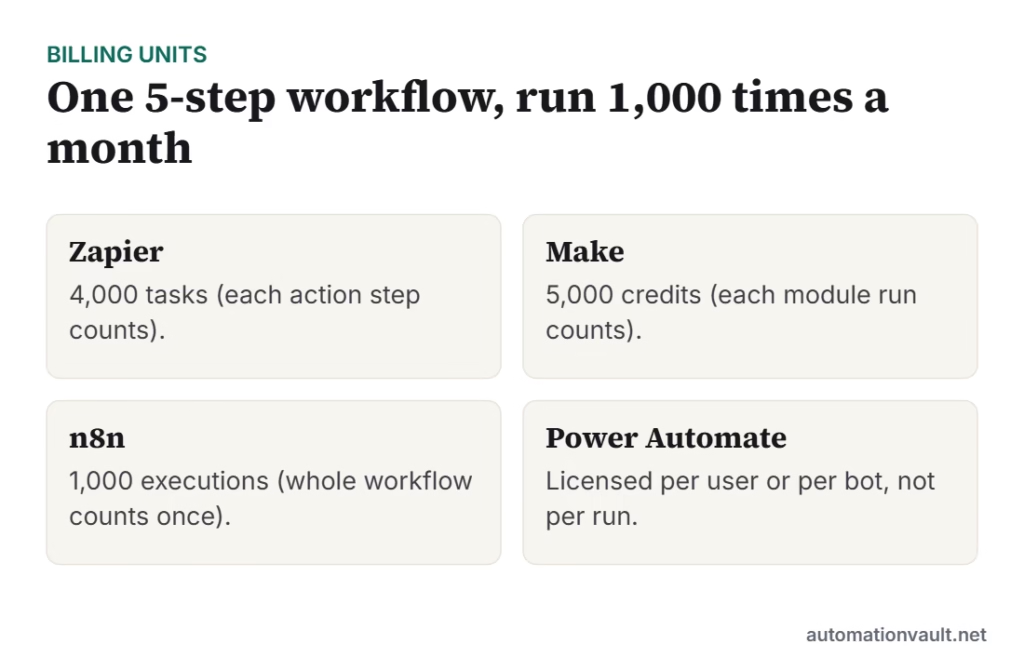
Zapier counts every action as a task, so that’s 4,000 tasks. Make counts every module, including the trigger, so roughly 5,000 credits, and a polling trigger also uses credits on checks that find nothing new. n8n counts one execution per run however many steps it has, so 1,000. Power Automate is licensed per user or per bot instead. For long, multi-step workflows, n8n and Make pull ahead on cost; for a handful of simple two-step automations, Zapier’s convenience may be worth paying for.
The tools in detail
Zapier
The most popular no-code automation tool. You build “Zaps” from a trigger and actions using a simple step-by-step editor, with AI help for writing Zaps from a description.
- Pricing: Free plan with 100 tasks a month; paid plans start at about $20 a month for 750 tasks and scale by task volume.
- Good at: Ease of use, the largest integration library, good templates.
- Watch out for: Costs climb quickly with multi-step workflows and high volume.
- Best for: Non-technical teams who want something working today.
Make (formerly Integromat)
A visual automation builder where you design “scenarios” on a canvas, with routers, filters, iterators and error handling. Make bills in credits; each module action in a scenario uses one.
- Pricing: Free plan with 1,000 credits a month and two active scenarios; Core starts at about $9 a month billed annually ($10.59 monthly) for 10,000 credits. Some AI modules use credits at different rates.
- Good at: Complex branching logic, data transformation, value for money.
- Watch out for: The canvas takes longer to learn, and polling triggers use credits even when nothing has changed.
- Best for: Teams with complex workflows who want lower costs without writing code.
n8n
A source-available (“fair-code”) automation platform with a node-based visual editor that also lets you write JavaScript or Python inside workflows. You can use n8n Cloud or run it on your own server.
- Pricing: Self-hosted is free apart from your server costs; n8n Cloud has a trial and paid plans from about $24 a month, billed per workflow execution.
- Good at: Cost at scale, flexibility, full data control when self-hosted, strong AI and agent building blocks.
- Watch out for: Self-hosting means you own updates, security and backups. It is more technical than Zapier or Make.
- Best for: Developers, technical founders and teams with high volumes or strict data rules.
Microsoft Power Automate
Microsoft’s automation suite: cloud flows connect apps through connectors, and desktop flows automate Windows applications (RPA). It integrates tightly with Outlook, Teams, SharePoint, Excel and Dataverse.
- Pricing: Many Microsoft 365 licences include cloud flows with standard connectors. Premium is about $15 per user per month (premium connectors plus attended desktop RPA); unattended bots are licensed per bot.
- Good at: Microsoft 365 integration, approvals in Teams and Outlook, desktop RPA in the same tool.
- Watch out for: Premium connectors (Salesforce, SAP and others) need paid licences, and it is less pleasant outside the Microsoft world.
- Best for: Organisations that already live in Microsoft 365.
Other tools worth knowing
- Activepieces: an open-source, self-hostable alternative with a Zapier-like editor.
- Pipedream: developer-focused, code-first workflows with a generous free tier.
- Approval and form workflow tools (such as Kissflow or Flokzu): better suited to internal approval processes like purchase requests and leave approvals than to app-to-app integration.
- Built-in automations in tools like ClickUp, Monday.com, HubSpot or Zoho: often enough for automations that stay inside one app.
How to choose
- List your first five automations. Write down the trigger, each step and how often it runs per month.
- Check the integrations you need in each tool, including whether they are “premium” in Power Automate.
- Estimate monthly usage in each tool’s unit (tasks, credits or executions) and price it.
- Consider who will maintain it. If nobody on the team is technical, Zapier or Make is safer than self-hosted n8n.
- Start on the free tier and build one real workflow before committing to an annual plan.
If a process involves a desktop application with no API or integration, a workflow tool alone won’t reach it. That’s where RPA comes in; see RPA vs intelligent automation.
Looking for ideas? Our list of everyday tasks to automate and WhatsApp automation use cases are good starting points.
Frequently asked questions
Which workflow automation tool is cheapest?
At scale, self-hosted n8n is usually cheapest because you pay only for your server and it counts one execution per run. Among hosted tools, Make is generally cheaper per unit than Zapier. For a few simple automations, the free tiers of Zapier or Make may cost nothing at all.
Is Zapier worth it?
Yes, if ease of use and speed matter more than cost, or you need an integration only Zapier has. Many teams start on Zapier and move high-volume workflows to Make or n8n later.
Is n8n really free?
The self-hosted version is free to use under its fair-code licence; you pay for the server and your own time maintaining it. n8n Cloud, the hosted version, is a paid subscription.
Can these tools use AI?
Yes. All four now offer AI steps (calling an LLM to summarise, classify or draft text) and some support AI agents. AI steps can carry extra costs from the tool, the model provider, or both.
Related posts:
 UiPath Competitors: 7 Alternatives Compared (and How to Choose)
 10 Time-Consuming Tasks You Can Automate Today (and the Tools to Use)
 10 WhatsApp Automation Use Cases for Businesses (and How Pricing Works Now)
 CERT-In Warns AI Agents Breached Indian Systems: A Security Checklist for Anyone Running Automations

Leave a Reply