Cognitive RPA is robotic process automation combined with AI techniques such as optical character recognition (OCR), natural language processing and machine learning. Classic RPA can only follow fixed rules on structured data. Cognitive RPA lets a bot cope with messy inputs such as scanned invoices, free-text emails and varied forms, and make simple judgements about them. Today, most vendors group this under the broader label intelligent automation, and add large language models and AI agents to the mix.
Key takeaways
- Cognitive RPA = RPA for the “doing” + AI for the “reading and judging”.
- It extends automation to unstructured inputs: documents, emails, images and text.
- Use confidence thresholds and human review so errors do not slip through.
- Modern implementations use document AI and language models; the term “cognitive RPA” is less common than “intelligent automation”.
RPA vs cognitive RPA
| Traditional RPA | Cognitive RPA | |
|---|---|---|
| Input | Structured, predictable data | Structured and unstructured data |
| Logic | Fixed rules | Rules plus AI predictions and classifications |
| Handles change | Breaks when formats change | Adapts to varied layouts and wording |
| Typical use | Copying data between systems | Reading invoices, triaging emails, extracting contract terms |
| Risk | Fails visibly when something changes | Can be wrong confidently, so needs review |
For a fuller comparison, read RPA vs intelligent automation.
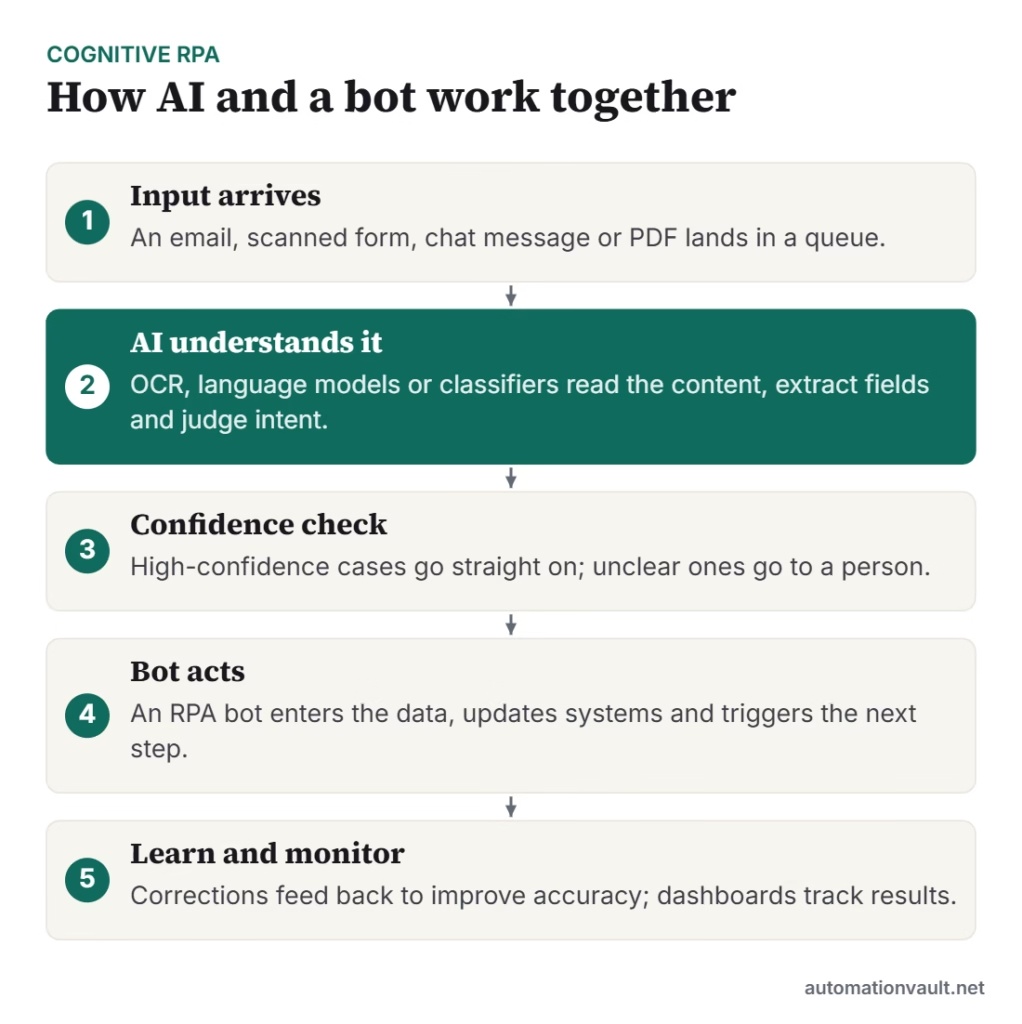
The AI techniques behind it
- OCR and document AI: read text and tables from scans and PDFs; see intelligent document automation.
- Natural language processing: classify emails, extract names, dates and intent, and detect sentiment.
- Machine learning: predict outcomes such as whether a claim looks fraudulent, or which team should handle a ticket.
- Large language models: summarise long text, draft replies and extract fields from varied documents with little training.
- Process mining: find which processes are worth automating by analysing system logs.
Examples
- Accounts payable: AI reads supplier invoices in different layouts, and a bot posts them into the ERP.
- Insurance claims: language models summarise claim notes and classify severity; a bot opens the case in the claims system.
- Customer service: AI triages incoming emails by topic and urgency, and bots update the CRM and send standard replies.
- HR onboarding: AI extracts details from identity and qualification documents, and bots create accounts and records.
- KYC in banking: AI checks documents and flags mismatches for human review, while bots update the customer file.
Design tips
- Set confidence thresholds: auto-process above the threshold, send the rest to a person.
- Measure straight-through processing rate and accuracy separately.
- Keep humans in the loop for decisions about money, health, legal status or employment.
- Log inputs, AI outputs and decisions so you can audit and improve.
- Review data protection rules before sending personal data to cloud AI services.
Challenges
AI models are never perfect, so plan for errors rather than hoping to avoid them. Data quality matters, since poor scans produce poor extraction. Costs can grow with volume when AI is billed per page or per call. And people need training to work with automation, not just alongside it. A governance structure such as an automation Center of Excellence helps, and our RPA best practices still apply.
Worked example: triaging a shared support inbox
A support team receives 600 emails a day in one shared inbox. Each one needs a category, a priority and a ticket in the help desk system. Here is how cognitive RPA handles it:
| Step | What happens | Who does it |
|---|---|---|
| 1. Read | A language model reads the email and attachments | AI |
| 2. Classify | It assigns a topic (billing, delivery, technical) and an urgency, with a confidence score | AI |
| 3. Look up | A bot finds the customer record and recent orders | RPA bot |
| 4. Decide | Above 90% confidence, continue; otherwise send to an agent with the AI summary attached | Rule |
| 5. Act | The bot creates the ticket, fills in fields and sends an acknowledgement | RPA bot |
| 6. Review | Agents correct wrong labels, and the corrections are used to improve the model | Person + AI |
The team measures how many emails are handled without a touch, how often agents correct the AI, and how long customers wait. Those numbers decide when to raise the confidence threshold or add more categories. The 90% figure here is only an example; set yours from testing on real emails.
Questions to ask before you start
- Which inputs are unstructured, and how much variation is there?
- What is the cost of a wrong decision, and who reviews it?
- Can we test the AI on 200–500 real examples before building the bot?
- Where will personal data be processed, and does that meet our policy?
Frequently asked questions
Is cognitive RPA the same as intelligent automation?
They overlap. “Cognitive RPA” usually means RPA with added AI capabilities, while “intelligent automation” is the broader term that also covers workflow, process mining and AI agents.
Do I need a data scientist to use cognitive RPA?
Often not. Many platforms offer pre-trained document and language models that business teams can configure, though complex or regulated cases benefit from specialist help.
Will AI agents replace RPA?
Agents are good at deciding what to do, while bots remain reliable at carrying out exact steps. Most organisations will combine them rather than replace one with the other.



Leave a Reply