
UiPath is the best-known name in robotic process automation, but it isn’t the only serious option, and for many teams it isn’t the best fit. Licensing can get complex as you scale, and if your company already runs on Microsoft or a low-code platform, a tool you already pay for may do most of the job.
This guide compares the main UiPath alternatives as they stand today: what each is good at, where it struggles, and which kind of organisation it suits.
Key takeaways
- In Gartner’s 2025 Magic Quadrant for RPA, UiPath, Automation Anywhere and SS&C Blue Prism were all named Leaders, so the top tier is a genuine three-way choice.
- Microsoft Power Automate is usually the cheapest starting point for Microsoft 365 shops, with attended RPA included in the Premium plan.
- Pega, Appian and ServiceNow include RPA, but they make the most sense when your process apps already live on those platforms.
- Every major vendor now sells “agentic” AI on top of RPA. Judge it on a real pilot, not the demo.
Why teams look beyond UiPath
- Cost at scale. Unattended robots, orchestrator capacity and AI add-ons are licensed separately, and the total grows quickly once you move past a pilot.
- Existing platforms. If you already pay for Microsoft 365, Pega or ServiceNow, their built-in automation may cover your needs without a second vendor.
- Skills. Some teams have Power Platform or Python developers, not UiPath-certified ones.
- Governance style. Highly regulated organisations sometimes prefer a more centrally controlled model.
None of these make UiPath a bad choice. It has one of the broadest product sets (RPA, document understanding, process mining, testing and agents) and a very large community. The point is to choose deliberately.
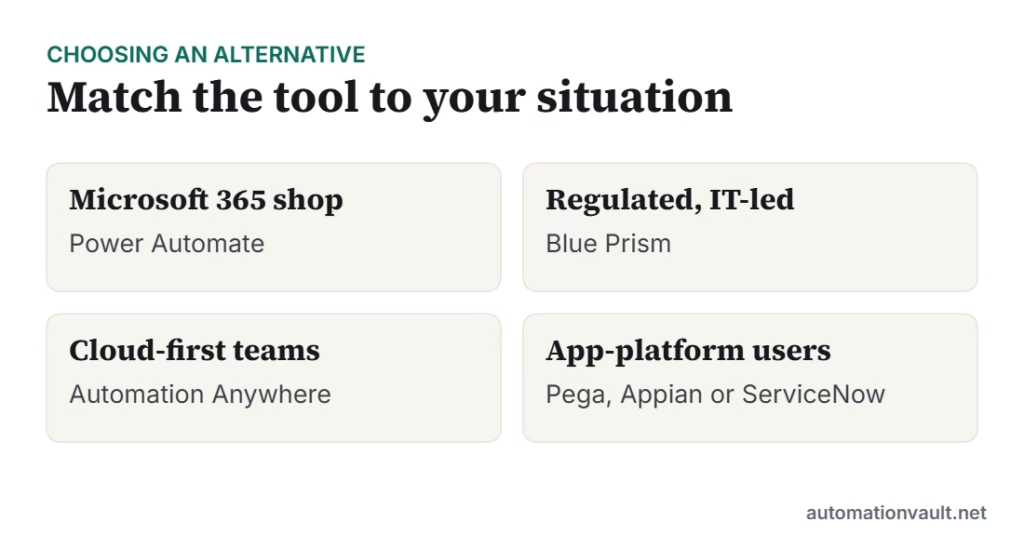
The main UiPath alternatives
1. Automation Anywhere
A cloud-native automation platform and long-time UiPath rival. Bots are built and managed from a web-based control room, and the company now markets an agentic layer (AI agents plus a process reasoning engine) alongside classic RPA and document AI.
- Strengths: Cloud-first architecture, strong document processing, agent features in the same platform.
- Watch out for: Pricing is quote-based and add-ons can stack up; plan your licence mix carefully.
- Best for: Mid-size and large companies that want SaaS-delivered RPA and AI without running their own infrastructure.
2. SS&C Blue Prism
One of the original enterprise RPA products, now owned by SS&C Technologies. Blue Prism is built around centrally governed “digital workers” that IT designs, tests and releases in a controlled way.
- Strengths: Strong security, audit trails and central control; popular in banking, insurance and the public sector.
- Watch out for: Less suited to business users building their own automations; development can feel heavier than in newer tools.
- Best for: Regulated, IT-led programmes where governance matters more than speed of citizen development.
3. Microsoft Power Automate
Microsoft’s automation suite: cloud flows connect apps through APIs, and desktop flows (Power Automate Desktop) do screen-level RPA on Windows. It sits inside the Power Platform alongside Power Apps and Dataverse.
- Strengths: Low entry price, deep Microsoft 365 integration, a huge connector library, and a free desktop app for Windows users.
- Watch out for: Complex unattended RPA at scale can get pricey per bot, and non-Microsoft environments get less love.
- Best for: Microsoft-centric organisations, departmental automation and teams starting small.
4. Pega
Pega is a low-code platform for case management and customer engagement. Its robotic automation sits inside larger workflow and decisioning apps rather than being sold as a standalone bot tool.
- Strengths: End-to-end case handling, strong decisioning, AI-assisted app design.
- Watch out for: Heavy and expensive if all you want is RPA.
- Best for: Large enterprises already building customer service or operations apps on Pega.
5. Appian
A low-code process platform with built-in RPA, document processing and process mining. Appian RPA came from its acquisition of Jidoka.
- Strengths: Process apps, RPA and data in one platform; good for orchestrating people, bots and systems together.
- Watch out for: Like Pega, it is a platform decision rather than a bot tool.
- Best for: Organisations building workflow applications that need some bot steps inside them.
6. ServiceNow
ServiceNow added RPA to its platform so service workflows (IT, HR, customer service) can automate steps in systems that have no API.
- Strengths: Native fit with ServiceNow workflows, tickets and approvals.
- Watch out for: Mainly valuable if your processes already run in ServiceNow.
- Best for: IT and service-management teams that want automation inside their existing ServiceNow processes.
7. Tungsten Automation (formerly Kofax)
Kofax rebranded as Tungsten Automation in 2024. Its strengths are document capture and intelligent document processing, with RPA as part of the suite. Our older Kofax RPA review covers its history.
- Strengths: Mature document capture, invoice and forms processing.
- Watch out for: Smaller RPA ecosystem than the top three.
- Best for: Document-heavy operations such as accounts payable, mailrooms and claims.
Developer-first option: if your team prefers code over drag-and-drop, Python-based frameworks such as Robot Framework (open source), or Robocorp’s tooling (now part of Sema4.ai), let you build automations as code with normal version control.
Side-by-side comparison
| Platform | Delivery | Pricing model | Strongest at | Typical buyer |
|---|---|---|---|---|
| UiPath | Cloud or self-hosted | Quote-based platform and robot licences | Breadth: RPA, document AI, mining, testing, agents | Enterprises building a CoE |
| Automation Anywhere | Cloud-native | Quote-based, bundles and add-ons | SaaS RPA with agentic and document AI | Cloud-first mid-size and large firms |
| SS&C Blue Prism | Cloud or self-hosted | Quote-based digital worker licences | Governance and security | Banks, insurers, public sector |
| Power Automate | Microsoft cloud | Per user and per bot (published prices) | Microsoft 365 integration, low entry cost | Microsoft-centric organisations |
| Pega | Cloud or self-hosted | Quote-based platform licence | Case management and decisioning | Large customer-service operations |
| Appian | Cloud or self-hosted | Quote-based platform licence | Process apps with bots inside | Workflow-heavy organisations |
| ServiceNow | Cloud | Add-on to ServiceNow subscriptions | Automation inside service workflows | ServiceNow customers |
| Tungsten Automation | Cloud or self-hosted | Quote-based | Document capture and IDP | Document-heavy back offices |
What it costs: the one vendor with public prices
Most vendors quote privately, but Microsoft publishes Power Automate prices. As listed in mid-2026: Premium is about $15 per user per month (premium connectors plus attended desktop RPA), the Process plan is about $150 per bot per month for unattended RPA, and Hosted Process is about $215 per bot per month for Microsoft-hosted machines. Microsoft 365 licences already include cloud flows on standard connectors.
For quote-based vendors, ask for the price of three things separately: the number of attended and unattended robots you need, orchestration and control-room capacity, and AI usage (document pages, agent runs or AI credits). AI consumption is where budgets most often surprise people.
How to evaluate: run the same pilot on two platforms
- Pick one real process with at least one messy input, such as invoices in different layouts.
- Build it on your top two candidates with each vendor’s help. Most will support a proof of concept.
- Measure build time, exception rate, how easy the bot is to change when a screen changes, and how the monitoring looks.
- Add up the three-year cost including licences, infrastructure, AI usage and the people needed to maintain bots.
- Check the skills market where you hire: certified developers for that platform, and partners nearby.
For the bigger picture, see RPA vs intelligent automation and whether RPA still has a future. If you are setting up a team to run this, our Center of Excellence guide covers the operating model.
Frequently asked questions
What is the best free alternative to UiPath?
For Windows users, Power Automate Desktop is free to install and covers basic attended desktop automation. UiPath also has a free Community edition for individuals and small teams. For developers, Robot Framework is open source.
Is Automation Anywhere better than UiPath?
Neither is better across the board. Both were named Leaders by Gartner in 2025. Automation Anywhere is fully cloud-native and pushes its agentic platform; UiPath has a broader product range and community. Run the same pilot on both.
Is Power Automate a real RPA tool?
Yes. Desktop flows record and replay actions on Windows applications and websites, and unattended bots can run on the Process or Hosted Process plans. It is weakest for complex, large-scale unattended programmes outside the Microsoft ecosystem.
Do I need RPA at all if my systems have APIs?
Often not. If the applications involved have reliable APIs or connectors, an integration or workflow tool is more robust than screen-level bots. RPA is the right fallback for systems you can’t integrate any other way.




Leave a Reply