WhatsApp is where many customers already are, especially in India, so it’s a natural channel to automate. But “WhatsApp automation” covers two very different things: quick replies in the free WhatsApp Business app, and fully automated flows through the WhatsApp Business Platform (the API). The pricing rules also changed significantly in 2025 and again in October 2026.
This guide covers ten use cases that work well, which message type each one uses (because that decides the cost), and how to get started without getting your number blocked.
Key takeaways
- Use the free WhatsApp Business app for small volumes: greeting messages, away messages, quick replies and a catalogue.
- Use the WhatsApp Business Platform (API), usually through a provider (a BSP), for chatbots, CRM integration and messages at scale.
- Meta charges per delivered message, by category (marketing, utility, authentication, service) and country.
- Since 1 October 2026, utility messages inside the 24-hour window are charged, and only the first 1,000 service replies per number each month are free.
- Customers must opt in. Spammy marketing gets numbers rate-limited or banned.
WhatsApp Business app vs WhatsApp Business Platform
| WhatsApp Business app | WhatsApp Business Platform (API) | |
|---|---|---|
| Cost | Free | Per delivered message, plus your provider’s fee |
| Automation | Greeting and away messages, quick replies, labels | Chatbots, workflows, CRM and order-system integration |
| Users | A few devices on one number | Many agents and bots on one number |
| Broadcasts | Limited lists | Approved template messages at scale |
| Best for | Shops and freelancers with modest volume | Businesses with hundreds or thousands of conversations |
10 use cases worth automating
1. Welcome and onboarding
Greet new customers, share what you offer, and collect basic details such as name, city or what they need.
- How it works: A keyword or first message triggers a short guided flow with buttons, and answers are saved to your CRM.
- Message type: Service (when the customer messages first)
2. Order confirmations and delivery updates
Customers want to know their order went through and where it is. These are among the most useful automated messages.
- How it works: Your e-commerce or order system triggers a template message at each status change: confirmed, shipped, out for delivery.
- Message type: Utility template
3. Appointment booking and reminders
Clinics, salons, tutors and service businesses lose money to no-shows.
- How it works: Customers pick a slot in chat; a reminder goes out the day before with “Confirm” and “Reschedule” buttons.
- Message type: Service (booking) and utility (reminders)
4. FAQ and support chatbot
Opening hours, prices, return policy and order status make up a large share of support questions.
- How it works: A chatbot answers common questions instantly and hands off to a person, with the chat history, when it can’t help.
- Message type: Service
5. Payment reminders and receipts
Send invoices, payment links and receipts where customers will actually see them. In India, UPI payment links work well here.
- How it works: Your billing system sends a reminder before the due date and a receipt after payment.
- Message type: Utility template
6. One-time passwords and verification
Login codes and verification messages delivered on WhatsApp instead of SMS.
- How it works: Your app requests a code; an authentication template delivers it with a copy-code button.
- Message type: Authentication template
7. Feedback and reviews
Ask for a rating right after delivery or a visit, while the experience is fresh.
- How it works: A short survey with buttons follows a completed order; low scores alert a manager.
- Message type: Utility or marketing template, depending on the wording
8. Lead qualification from ads
Click-to-WhatsApp ads send interested people straight into a chat.
- How it works: A bot asks two or three qualifying questions and routes hot leads to sales. Replies inside the 7-day ad entry window are free.
- Message type: Service, inside the free entry window
9. Abandoned cart and back-in-stock alerts
Recover sales from people who showed intent.
- How it works: Your shop triggers a message when a cart is left or an item returns, only for customers who opted in to marketing.
- Message type: Marketing template
10. Renewals and loyalty
Subscriptions, memberships, AMC contracts and policy renewals.
- How it works: A reminder goes out before expiry with a renewal link; loyalty points updates follow purchases.
- Message type: Utility (renewal notices) or marketing (offers)
How pricing works now
Meta switched from per-conversation to per-message pricing on 1 July 2025, and charges only for messages that are delivered. The price depends on the message category and the recipient’s country code. Two more changes took effect on 1 October 2026: utility templates sent inside an open customer service window are no longer free, and each business phone number now gets 1,000 free service messages per month, after which service replies are charged too.
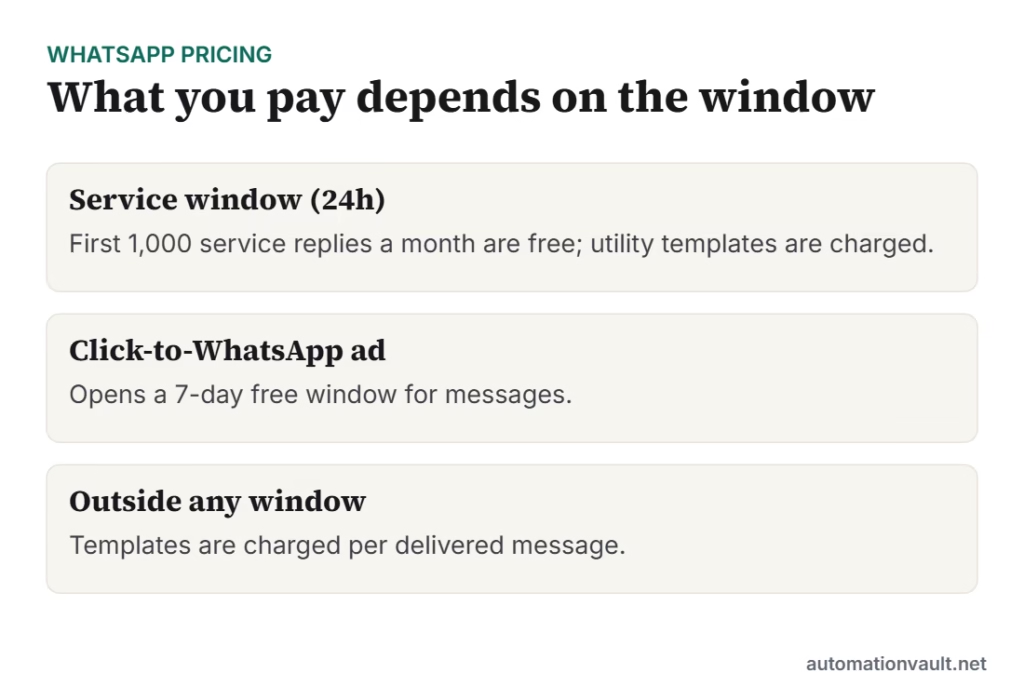
- Customer service window: 24 hours from the customer’s last message or call. Inside it you can send free-form replies; outside it only approved templates.
- Free entry point: when someone messages you from a Click-to-WhatsApp ad and you reply in time, a 7-day window opens in which most messages are free.
- Incoming messages are always free.
- Your provider (BSP) adds its own platform fee or markup on top of Meta’s rate, so compare the total.
India-specific: Meta now bills Indian businesses in INR. Accounts must move to INR billing by 31 December 2026, and Meta has said messages from eligible non-INR accounts will stop being delivered from 1 January 2027. Check with your provider that your account has migrated.
How to get started
- Start with the free app if you handle fewer than a few dozen chats a day. Set up a greeting message, an away message, quick replies and your catalogue.
- Move to the API through a provider when you need a chatbot, several agents or integration with your shop or CRM. Indian providers include names like Interakt, AiSensy, Wati and Gupshup; compare platform fees and the support you get.
- Get opt-in properly. Collect consent at checkout, in a form or in chat, and record it. India’s Digital Personal Data Protection Act also expects clear consent and a way to withdraw it.
- Write templates carefully. Every template is reviewed by Meta and assigned a category. Purely transactional wording is more likely to be approved as utility rather than marketing.
- Always offer a human. A “talk to a person” button keeps customers from getting stuck in a bot loop.
Mistakes to avoid
- Blasting marketing messages to people who never opted in. Block and report rates hurt your number’s quality rating and messaging limits.
- Hiding promotions inside “utility” templates. Meta re-categorises them, and you lose trust.
- Bots with no exit. Make the handover to a person obvious.
- Ignoring the 24-hour window. Plan which messages need templates so your flows don’t fail outside it.
If you’re choosing tools to connect WhatsApp with your other apps, see our workflow automation tools comparison. For the difference between simple bots and AI assistants, read chatbot vs conversational AI.
Frequently asked questions
Is WhatsApp automation free?
The WhatsApp Business app and its basic automation (greeting messages, away messages, quick replies) are free. The WhatsApp Business Platform charges per delivered message by category, plus your provider’s fee. Messages from customers to you are always free.
What changed on 1 October 2026?
Utility template messages sent inside an open customer service window became chargeable, and each business number now gets 1,000 free service messages per month, after which service replies are charged.
Can I send bulk WhatsApp messages?
Only to customers who have opted in, and only with approved template messages through the WhatsApp Business Platform. Unofficial bulk-sending tools violate WhatsApp’s terms and often get numbers banned.
Do I need a developer to use the WhatsApp API?
Not necessarily. Most providers offer no-code chatbot builders, shared inboxes and ready-made integrations with Shopify, WooCommerce and common CRMs. You’d need a developer for custom integrations with in-house systems.



Leave a Reply