
Most of us lose hours every week to small, repetitive jobs: sorting email, copying data between apps, chasing meeting times, writing up notes. Each task takes only a few minutes, but together they add up to a day or more each month. Here are ten tasks that are easy to automate today, how to approach each one, and tools worth trying, most of which have free plans or are already included in software you use.
Key takeaways
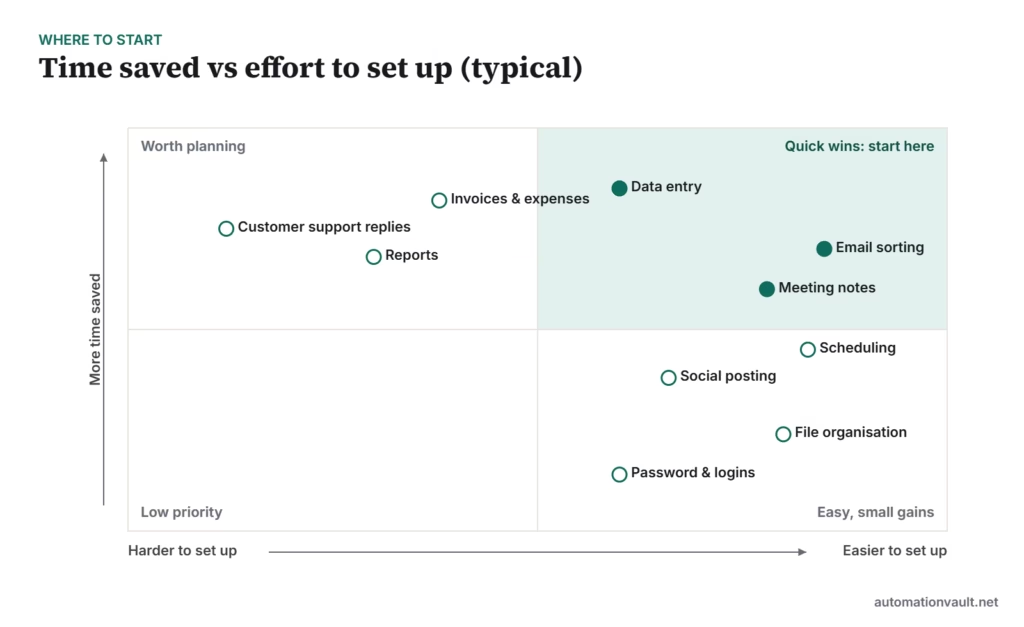
- Start with quick wins: email rules, scheduling links and meeting notes take minutes to set up.
- Data entry between apps is often the biggest time saver, using a workflow tool such as Zapier, Make, n8n or Power Automate.
- Check tools you already pay for first; Microsoft 365, Google Workspace and your accounting software include automation features.
- Keep a person in the loop for anything customer-facing or financial.
1. Email sorting and replies
Inbox triage is the classic time sink. Rules can label, file and forward messages automatically, and templates handle the replies you type every week.
- Create rules for newsletters, receipts and notifications so they skip the inbox.
- Save templates for common replies.
- Use your email app’s AI features to summarise long threads, and review drafts before sending.
Tools to try: Gmail filters and templates, Outlook rules and Quick Parts, SaneBox.
2. Meeting notes and action items
AI note-takers join calls, transcribe them and produce a summary with action items, so no one has to take minutes.
- Turn on transcription in Teams, Zoom or Google Meet if your plan includes it.
- Send the summary to a shared notes page or task list automatically.
- Tell participants the meeting is being recorded.
Tools to try: Built-in Teams, Zoom and Meet features, Otter.ai, Fireflies.ai.
3. Appointment scheduling
Back-and-forth emails to find a time disappear when people can book from your real availability.
- Share a booking link connected to your calendar.
- Add buffers, limits per day and automatic reminders.
- Collect the information you need in the booking form.
Tools to try: Calendly, Cal.com, Microsoft Bookings, Google Calendar appointment schedules.
4. Data entry between apps
Copying a new lead from a form into a CRM, or an order into a spreadsheet, is exactly what workflow tools were built for.
- Trigger a workflow when a form is submitted or a row is added.
- Map fields once, then let every new record flow through.
- Add a step that alerts you when something fails.
Tools to try: Zapier, Make, n8n, Microsoft Power Automate. Compare them in our workflow tools guide.
5. Invoices and expenses
Receipt capture and invoice extraction remove most manual keying in bookkeeping.
- Snap receipts with your accounting app’s mobile app.
- Forward supplier invoices to a dedicated inbox for automatic extraction.
- Set up bank feeds and matching rules.
Tools to try: The automation built into QuickBooks, Xero or Zoho Books; Dext. For more control, UiPath Clipboard AI or document AI tools.
6. Recurring reports
If you build the same report every week, automate the data refresh and the delivery.
- Connect your reporting tool directly to the data source.
- Schedule a refresh and an email or chat delivery.
- Replace manual spreadsheets with a shared dashboard.
Tools to try: Looker Studio, Power BI, scheduled exports from your CRM or accounting software.
7. Social media posting
Batch-write posts once a week and schedule them, instead of posting by hand every day.
- Plan a weekly content calendar.
- Queue posts across platforms in one tool.
- Reuse each post in several formats.
Tools to try: Buffer, Hootsuite, Later, or the native schedulers in Meta Business Suite and LinkedIn.
8. Customer support replies
Common questions can be answered instantly, leaving people to handle the complicated ones.
- Build a help centre or FAQ page first.
- Add a chatbot or AI assistant that answers from those articles and hands off to a person.
- Use saved replies and auto-tagging in your help desk.
Tools to try: Zendesk, Freshdesk, Intercom, or WhatsApp automation for messaging-first businesses. See also chatbot vs conversational AI.
9. File organisation
Rules can name, sort and back up files so you’re not hunting for documents.
- Save email attachments to the right cloud folder automatically.
- Use consistent naming templates.
- Set retention rules for old files.
Tools to try: Power Automate or Zapier with OneDrive, Google Drive or Dropbox; Hazel on macOS.
10. Passwords and logins
Typing and resetting passwords wastes time and invites security risks.
- Use a password manager that fills logins and generates strong passwords.
- Turn on single sign-on where your apps support it.
- Enable passkeys for services that offer them.
Tools to try: Bitwarden, 1Password, or your browser’s built-in password manager.
Quick comparison
| Task | Typical setup time | Best first tool |
|---|---|---|
| Email sorting | Under an hour | Your email app’s rules |
| Meeting notes | Minutes | Built-in transcription |
| Scheduling | Under an hour | A booking-link tool |
| Data entry between apps | A few hours | A workflow tool |
| Invoices and expenses | A few hours | Your accounting software |
| Recurring reports | Half a day | Your reporting tool |
| Social posting | Under an hour | A scheduler |
| Support replies | A few days | Help desk with AI answers |
| File organisation | Under an hour | Cloud storage rules |
| Passwords | Under an hour | A password manager |
Before connecting tools to email, files or customer data, check what access each app asks for and whether your organisation allows it.
Once you’ve automated a few tasks, keep them working with the habits in how to improve automation efficiency.
Frequently asked questions
Which task should I automate first?
Pick the one you do most often that follows the same steps each time. For most people that’s email sorting, scheduling or copying data between two apps.
Do I need to know how to code?
No. All the tools listed here can be set up without code, although workflow tools like n8n and Make reward a bit of technical comfort.
Are these tools free?
Many have free plans or trials, and several features are already included in Microsoft 365, Google Workspace and accounting software. Check current pricing before committing.







Leave a Reply