
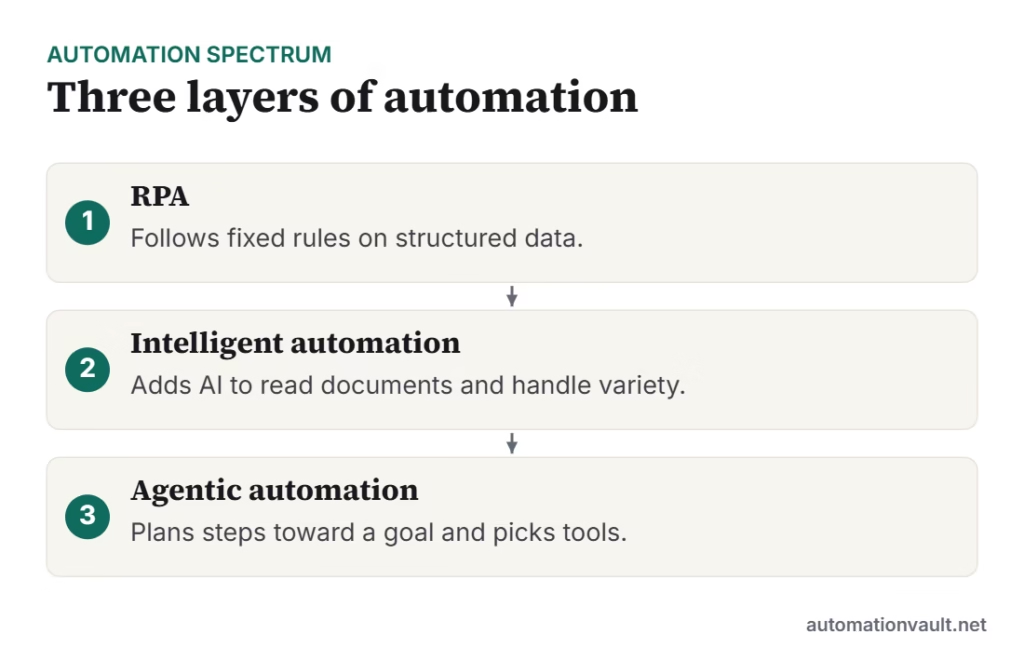
Robotic process automation (RPA) and intelligent automation (IA) are often used as if they mean the same thing. They don’t. RPA is a way to make software repeat exactly what a person does on screen. Intelligent automation wraps that same capability in AI so the system can cope with inputs that don’t look the same every time. A third layer, agentic automation, has now arrived on top of both.
This guide explains what each one actually does, where each fits, and how to decide which your process needs, without the vendor jargon.
Key takeaways
- RPA follows fixed rules on structured data. It is fast, cheap to run and easy to audit, but it breaks when screens or inputs change.
- Intelligent automation = RPA + AI (document reading, machine learning, language understanding). It handles messy inputs such as invoices, emails and scanned forms.
- Agentic automation uses large language models to plan steps toward a goal and call tools, including RPA bots.
- Most real programmes combine all three: rules where the work is predictable, AI where it isn’t, and people for judgement calls.
What is RPA?
RPA uses software “bots” that interact with applications the way a person would: clicking buttons, reading fields, copying values and filling forms. The bot follows a script someone designed in advance. If step four says “copy the value in the Total field”, the bot does exactly that, every time, at machine speed.
That makes RPA a good fit for work that is high-volume, rule-based and stable:
- Moving data between two systems that have no integration (for example, a legacy ERP and a CRM).
- Generating the same reports every day or month.
- Updating records in bulk from a spreadsheet.
- Routine checks such as matching a payment reference to an open invoice.
The trade-off is brittleness. A bot that relies on a button being in a certain place fails when the application’s layout changes, and it has no idea what to do with an input it wasn’t designed for. A large share of the cost of an RPA programme goes into maintaining bots, not building them.
What is intelligent automation?
Intelligent automation (sometimes called intelligent process automation, or hyperautomation in analyst reports) combines RPA with AI capabilities so the process can handle variation:
- Document understanding (OCR and intelligent document processing) to read invoices, purchase orders, IDs and forms in different layouts.
- Machine learning to classify items, predict values or detect anomalies, such as routing a support ticket or flagging a suspicious claim.
- Natural language processing to understand emails and chat messages and extract what the sender wants.
- Process and task mining to discover which processes are worth automating in the first place.
The key idea is that the AI turns unstructured input into structured data, and the RPA layer then acts on it. Crucially, good intelligent automation also knows when it isn’t sure: low-confidence results go to a person for review instead of being processed blindly. See our guide to intelligent document automation for a deeper look at that piece.
RPA vs intelligent automation: side by side
| RPA | Intelligent automation | |
|---|---|---|
| What it does | Repeats a fixed sequence of steps | Interprets inputs, then acts on them |
| Input data | Structured and consistent (fields, tables, fixed reports) | Structured, semi-structured and unstructured (PDFs, emails, scans) |
| Decision-making | If/then rules written by a person | Rules plus predictions and confidence scores |
| Handles change | Poorly: layout or format changes break bots | Better: models tolerate variation, but still need monitoring |
| Typical tools | UiPath, Automation Anywhere, Power Automate desktop flows, Blue Prism | The same platforms plus document AI, ML models and NLP services |
| Time to first result | Days to weeks | Weeks to months (models need training data and tuning) |
| Running cost | Low per transaction | Higher: AI services, review queues and model upkeep |
| Best for | High-volume, stable, rule-based work | Document-heavy or judgement-light work with variable inputs |
Where agentic automation fits
Since 2024, automation vendors have added AI agents: software built on large language models that is given a goal, decides which steps to take, and calls tools to carry them out. A tool can be an API, a search, or an existing RPA bot. Instead of designing every branch of a process in advance, you describe the outcome and the guardrails.
Agents are useful where the path varies from case to case, such as investigating a delayed shipment, answering a supplier query that needs data from three systems, or preparing a first draft of a reconciliation for a person to approve. They are less suitable where every step must be identical and fully auditable, which is exactly where traditional RPA shines.
In practice the layers stack: agents decide what to do, intelligent automation reads and classifies the messy input, and RPA bots execute the precise, repeatable steps inside systems that have no API.
How to choose for a given process
Work through these questions in order. The first “no” usually tells you which layer you need.
- Is the input always in the same format? If yes, plain RPA (or an API integration) is usually enough. If inputs vary (different invoice layouts, free-text emails), you need document AI or NLP, which is intelligent automation.
- Can you write down every rule? If a new team member could follow a checklist, RPA works. If the work needs judgement based on context, consider intelligent automation with a human review step, or an agent with approvals.
- Is there an API? If the systems involved have reliable APIs or connectors, use those first. Screen-level bots are the fallback for systems you can’t integrate any other way.
- What does a mistake cost? For high-risk steps (payments, compliance filings), keep deterministic rules and human sign-off, even if AI does the preparation.
- How often does it change? Processes and screens that change monthly will burn time in bot maintenance; favour API-based or AI-tolerant approaches there.
Good fits for RPA
- Daily data transfers between systems without an integration
- Scheduled report generation and distribution
- Bulk record updates from a validated spreadsheet
- User account set-up from a standard request form
Good fits for intelligent automation
- Accounts payable: reading supplier invoices in any layout and matching them to purchase orders
- Customer email triage: understanding intent and routing or drafting a reply
- KYC and onboarding: extracting data from ID documents with checks for low-confidence fields
- Claims processing: classifying documents and flagging anomalies for an adjuster
A practical way to start
- Pick one process with clear volume and a measurable cost, such as hours per month or error rate.
- Map it step by step and mark which steps are rules and which need reading or judgement.
- Automate the rule-based core with RPA or an API integration first; it delivers value quickly.
- Add AI only where the map shows unstructured input or classification, and route low-confidence cases to a person.
- Track exceptions from day one. If more than a small share of cases need manual handling, revisit the design before scaling.
If you are building a programme across several teams, our guides on setting up an automation Center of Excellence and the do’s and don’ts of RPA cover governance and common mistakes. For the platform question, see UiPath competitors compared.
Frequently asked questions
Is intelligent automation the same as hyperautomation?
Broadly, yes. “Hyperautomation” is an analyst term for combining RPA, AI, process mining and integration tools to automate as much of a business process as is sensible. Intelligent automation describes the same combination of rules-based bots and AI.
Is RPA being replaced by AI agents?
Not replaced, more absorbed. Agents are good at deciding what to do next, but businesses still need precise, repeatable execution inside legacy systems, which is what RPA bots provide. Most platforms now let agents call RPA bots as tools. Our article on whether RPA is dead covers this in more detail.
Do I need intelligent automation for every process?
No. If the inputs are consistent and the rules are clear, adding AI adds cost and complexity without benefit. Use AI where the input varies or a judgement call is needed.
Which is cheaper to run?
RPA is usually cheaper per transaction because it doesn’t call AI services or need review queues. Intelligent automation costs more to run but can automate work that RPA alone cannot touch, so compare it with the cost of doing that work manually.



Leave a Reply