
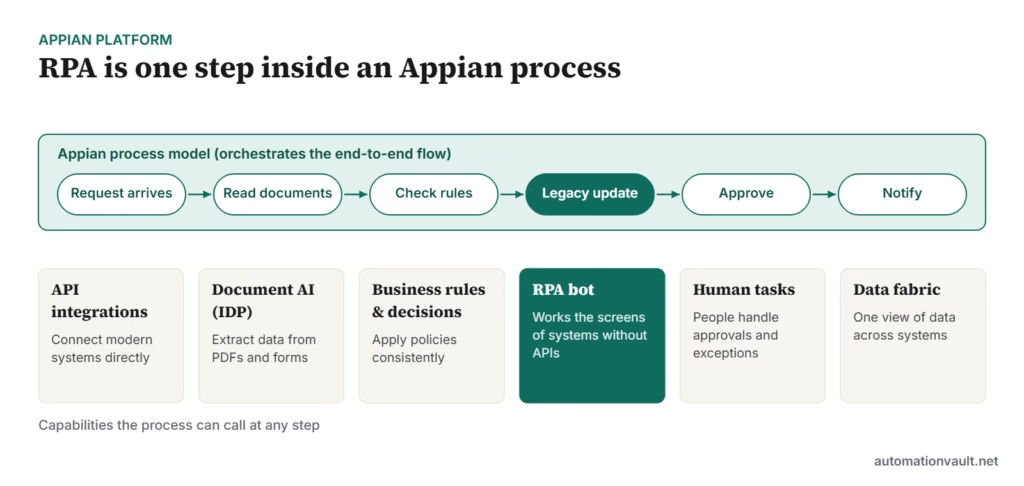
Appian RPA is the robotic process automation component of the Appian Platform, a low-code platform for building process applications. Unlike standalone RPA tools, Appian treats bots as one step in a larger process that also includes people, rules, documents and APIs. This guide explains what Appian RPA does, how it fits into the platform, how it is licensed, and when it is (and isn’t) the right choice.
Key takeaways
- Appian RPA is part of the Appian Platform, not a separate product you buy on its own.
- Its strength is orchestration: bots, people, AI and APIs in one process model.
- All three Appian plans include RPA; the number of bots varies by plan (5, 25 or unlimited per app).
- A free Community Edition lets you learn and build, but not run production apps.
- If you only need desktop bots, a dedicated RPA tool may be simpler; if you are building full process apps, Appian is a strong fit.
How Appian RPA fits into the platform
In most RPA tools the bot is the centre of the automation. In Appian, the process model is the centre, and a bot is called only for the steps that need to work through a user interface, typically an older system with no API.
Key features
- Low-code bot design: a task recorder and drag-and-drop editor for building robotic tasks, with Java available for advanced logic.
- Cross-platform execution: robots can run on Windows, Linux or macOS machines.
- Managed from Appian: robots are deployed, scheduled and monitored from the Appian console rather than a separate orchestrator.
- Works with Appian AI and document processing: extract data from documents, then hand it to a bot or a person.
- Exception handling with people: when a bot can’t complete a step, the process can route the case to a human task.
- Process insight: Appian’s Process HQ (on higher plans) helps you see where work slows down and where automation would help.
Licensing and plans
Appian sells the platform per user, per month, per app, with three plans. Prices are quoted rather than published. According to Appian’s pricing page, RPA is included in all three, with different bot allowances:
| Plan | RPA bots | Notable extras |
|---|---|---|
| Standard | 5 | Core low-code platform |
| Advanced | 25 | AI features (Agent Studio, document AI) and Process HQ |
| Premium | Unlimited | Higher AI and document-extraction limits |
For learning, Appian’s free Community Edition gives you a personal platform instance. It isn’t licensed for production use.
Getting started
- Sign up for the Appian Community Edition and work through the RPA learning path.
- Set up a robot host machine and install the Appian RPA agent.
- Record a simple robotic task, such as logging into a test app and reading a value.
- Call the robotic task from a process model, and add a human task for failures.
- Monitor runs and logs from the RPA console.
Here’s an introduction to Appian RPA from Appian:
Appian RPA vs. dedicated RPA tools
| Appian RPA | Dedicated RPA (e.g. UiPath, Automation Anywhere) | |
|---|---|---|
| Main strength | End-to-end process apps with bots as one step | Breadth of desktop and UI automation features |
| Best buyer | Teams already building on Appian, or needing case management | Teams automating many tasks across existing apps |
| Developer pool | Smaller, Appian-specialist | Larger, widely available |
| Licensing | Part of platform plans | Separate robot and platform licences |
If you’re comparing RPA platforms more widely, see UiPath competitors compared, and for where AI changes the picture, RPA vs intelligent automation.
Where Appian RPA works well
- Banking and insurance: onboarding, claims and loan processes that combine documents, approvals and older core systems.
- Public sector: case management with audit trails, where bots update legacy systems.
- Operations teams already using Appian for workflow who need to reach a system without an API.
Building a reliable Appian robotic task
The same design rules that apply to any RPA bot apply in Appian, with one advantage: because the bot sits inside a process, failures can be handled by the process rather than by the bot alone.
- Keep robotic tasks small. One task per system interaction (log in and read a record, or update a field) is easier to test and reuse than one long script.
- Pass data in and out explicitly. Let the process model supply inputs and receive outputs, so the bot doesn’t need to know about the wider case.
- Use stable selectors. Prefer element IDs over screen positions or images, which break when layouts change.
- Return a clear status. Have every task report success, a business exception (for example, record not found) or a technical failure, and route each differently in the process.
- Store credentials securely in Appian’s credential store rather than in the task.
- Log enough to debug. Screenshots on failure and step-level logs save hours when a target application changes.
When to choose an API instead
A bot is the right tool only when there is no better way into a system. Before building a robotic task, check whether the application offers an API, a database integration or a file export. Appian’s integration objects and connected systems are faster and far more stable than screen automation. Many teams use Appian RPA as a bridge: the bot keeps the process running today, and is replaced by an integration once the old system is upgraded.
For broader guidance on designing bots, read our do’s and don’ts of RPA.
Frequently asked questions
Can I buy Appian RPA on its own?
Appian RPA is sold as part of the Appian Platform plans rather than as a standalone RPA product.
Is Appian RPA free?
You can learn and build for free with the Community Edition. Production use requires a paid Appian plan.
Does Appian RPA need Windows?
No. Appian robots can run on Windows, Linux or macOS hosts, depending on the applications they automate.



Leave a Reply