Most business data still arrives inside documents: invoices, contracts, claims, bank statements, forms and emails. Intelligent document automation (IDA), also called intelligent document processing (IDP), uses AI to read those documents, pull out the data and send it where it needs to go. It replaces manual keying, speeds up processes and reduces errors, as long as it is set up with sensible checks. This guide explains how it works, where it fits and how to choose a tool.
Key takeaways
- IDA combines OCR, machine learning and increasingly large language models to classify documents and extract data.
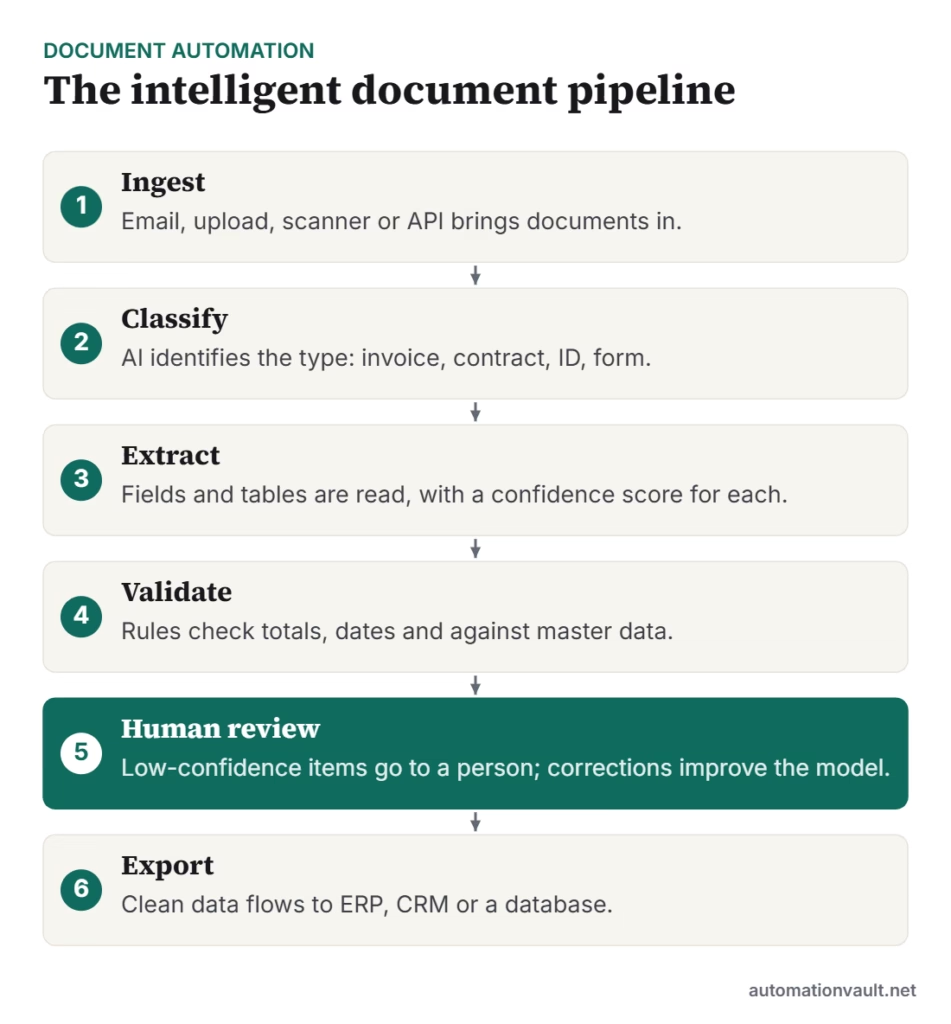
- The pipeline is ingest, classify, extract, validate, human review and export.
- Measure field-level accuracy and the share of documents processed without a touch.
- Start with one high-volume document type such as supplier invoices.
- Review personal and financial data handling before using cloud AI services.
How IDA works
- OCR turns scans and photos into text.
- Classification decides what kind of document it is, so the right rules apply.
- Extraction finds fields and tables, either with trained models, templates or language models.
- Validation checks results against rules and master data, such as supplier lists, purchase orders or tax numbers.
- Human-in-the-loop review lets people correct low-confidence results, which can improve the model.
- Integration sends clean data to ERP, CRM, core banking or workflow systems, often through RPA when there is no API; see cognitive RPA.
Where it is used
| Industry | Documents | Typical outcome |
|---|---|---|
| Finance | Invoices, bank statements, payslips | Faster accounts payable, fewer keying errors |
| Banking | KYC documents, loan applications | Quicker onboarding with flagged mismatches |
| Insurance | Claims forms, medical bills, policies | Faster intake and triage |
| Logistics | Bills of lading, delivery notes, customs forms | Shorter clearance and billing cycles |
| Legal | Contracts and agreements | Key terms and dates extracted for review |
| HR | CVs, ID proofs, certificates | Quicker onboarding and records |
Traditional extraction vs language models
Older tools needed templates or training for each document layout. Newer tools use language models that can read varied layouts with little or no training, which is a big help for documents such as contracts. But language models can also produce fluent mistakes, so validation rules and review remain essential, especially for amounts, dates and identifiers.
Tools to evaluate
- Cloud services: Microsoft Azure AI Document Intelligence, Google Document AI and Amazon Textract.
- RPA vendors’ modules, such as UiPath Document Understanding and Tungsten Automation’s capture and invoice products; see Tungsten RPA.
- Specialist vendors such as ABBYY and Hyperscience.
- Language models used through an API, with your own validation layer.
Test two or three tools on 200–500 of your own documents, including poor scans, before deciding. If you want to try a simple version of copy-and-paste extraction, see UiPath Clipboard AI.
How to measure success
| Measure | Why it matters |
|---|---|
| Field-level accuracy | Shows how often each extracted value is right |
| Straight-through processing rate | Share of documents processed with no human touch |
| Review time per document | Shows the effort that remains |
| End-to-end turnaround | Reflects business benefit |
| Cost per document | Compares with manual processing |
Risks and how to manage them
- Poor input quality: ask suppliers for digital PDFs where you can, and set scan standards.
- Privacy: documents often hold personal data; check where it is processed and who can see it.
- Silent errors: add validation rules and sample checks even for high-confidence results.
- Over-automation: keep a person involved in decisions about payments, claims and legal status.
IDA works best as part of a wider programme; see our RPA strategy roadmap and tasks worth automating.
Frequently asked questions
What is the difference between OCR and intelligent document processing?
OCR only converts images to text. Intelligent document processing also classifies documents, extracts and validates the data, and routes exceptions for review.
How accurate is document AI?
It varies by document type and quality. Test on your own samples and measure field-level accuracy; avoid relying on vendor headline figures.
Can intelligent document automation handle handwriting?
Some tools can read handwriting with lower accuracy than print. Test with your own examples and plan for more human review.



Leave a Reply