
Buying automation tools is easy. Getting real efficiency from them is harder: many businesses end up with bots that save less time than expected, break often, or automate a process that should have been simplified first. This guide covers five practical ways to improve automation efficiency, how to measure it, and the mistakes that quietly eat into the gains.
Key takeaways
- Measure before you automate, or you can’t prove any improvement.
- Simplify a process first; automating a bad process just makes mistakes faster.
- Match the tool to the task: integrations for apps with APIs, RPA for screens, AI for unstructured inputs.
- Monitor every automation like a production system, with an owner and a success rate.
- Review the portfolio each quarter: fix, extend or retire.
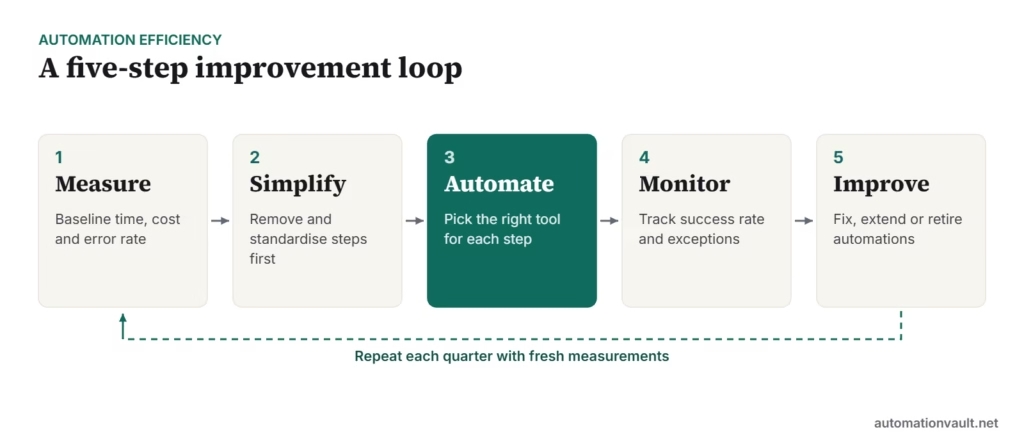
1. Measure the baseline first
Before changing anything, record how the process performs today. Without a baseline, “it feels faster” is the only evidence you’ll have.
- Volume: how many cases per day or month.
- Handling time per case, including waiting and rework.
- Error or rework rate.
- Cost per case (people time multiplied by a loaded hourly rate).
- Turnaround time from request to completion.
A week of manual tracking in a spreadsheet is usually enough. For complex processes, process or task mining tools can capture this automatically from system logs.
2. Simplify before you automate
Look for steps that exist only because of history: duplicate approvals, re-keying the same data, reports nobody reads. Removing a step is always cheaper than automating it. Standardise inputs too; a single invoice template or a web form instead of free-text emails makes automation far more reliable.
3. Choose the right tool for each step
| If the step involves… | Use |
|---|---|
| Moving data between cloud apps with APIs | A workflow tool such as Zapier, Make, n8n or Power Automate |
| Working through screens of an older desktop or web app | RPA |
| Reading invoices, forms or emails | Document AI / intelligent document processing |
| Judgement on unstructured text | An AI model, with human review for important decisions |
| Approvals and hand-offs between people | Workflow or case management |
Most real processes need two or three of these together. See our workflow automation tools comparison and RPA vs intelligent automation for more detail.
4. Monitor automations like production systems
An automation that fails silently can do more damage than the manual process it replaced. Give every automation a named owner, and track:
- Success rate (completed without human help).
- Exception volume and the most common reasons.
- Run time and queue backlog.
- Alerts when a run fails or volumes change unexpectedly.
A success rate that drifts downward is usually the first sign that an upstream application, file format or policy has changed.
5. Improve continuously
Review your automations every quarter against the original baseline. For each one, decide whether to keep it as is, fix recurring exceptions, extend it to cover more cases, or retire it because the process has changed. Small fixes to high-volume automations usually beat building new ones.
How to calculate efficiency gains
| Measure | Formula |
|---|---|
| Hours saved per month | (Old handling time − new handling time) × monthly volume |
| Cost saved per month | Hours saved × loaded hourly cost − running costs (licences, support) |
| Payback period | Build cost ÷ monthly cost saved |
| Quality gain | Old error rate − new error rate |
For example, if a process handles 2,000 invoices a month, and automation cuts handling time from 6 minutes to 1 minute, that is 10,000 minutes, or about 167 hours, returned each month, before subtracting running costs.
Common mistakes that reduce efficiency
- Automating exceptions first. Cover the main path and route rare cases to people.
- Ignoring maintenance. Budget time every month to keep automations working.
- Measuring bots, not outcomes. The number of automations matters less than the hours and errors removed.
- No one owns it. Without an owner, broken automations are noticed by customers first.
- Skipping the people side. Explain changes and retrain staff for the work that remains.
Not sure where to begin? Our list of everyday tasks worth automating is a good starting point, and for larger programmes see how to set up an automation CoE.
A worked example: accounts payable
A mid-sized distributor processed around 1,500 supplier invoices a month by hand. Here’s how the five steps might apply:
- Measure: eight minutes per invoice on average, with about 4% needing rework because of keying errors.
- Simplify: suppliers were asked to email invoices to one address, and a second approval for small amounts was dropped.
- Automate: document AI extracts invoice data, a workflow matches it to purchase orders through the accounting system’s API, and only mismatches go to a person.
- Monitor: the team tracks the share of invoices posted without a touch, and the top mismatch reasons each week.
- Improve: the most common mismatch, missing PO numbers, is fixed by changing the supplier onboarding form.
The figures above are illustrative, but the pattern is typical: the biggest gains came from simplifying inputs and handling exceptions well, not just from the automation itself.
Frequently asked questions
What is a good success rate for an automation?
It depends on the process, but many teams aim for well above 90% of cases completing without human help, with exceptions handled through a clear queue.
How often should automations be reviewed?
At least quarterly, plus whenever an upstream system, form or policy changes.
Should small businesses worry about this?
Yes. Even a few simple automations benefit from a baseline, an owner and a periodic check that they still work.






Leave a Reply