Business automation uses software to carry out tasks that people used to do by hand. Artificial intelligence extends that reach to work that involves language, images and judgement. This guide combines our earlier posts on business automation and on AI with automation, and shows where each approach fits, with a practical way to begin.
Key takeaways
- Rule-based automation is best for stable, structured, high-volume tasks.
- AI automation adds the ability to read, classify, predict and draft, but needs oversight.
- Pick processes by volume, rule clarity, error cost and data availability.
- Start small, measure, and expand; most value comes from many modest automations.
What business automation covers
- Finance: invoice processing, reconciliations, reporting.
- HR: onboarding, leave requests, document collection.
- Sales and marketing: lead routing and follow-up; see marketing automation tools.
- Customer service: ticket triage and replies; see contact center automation.
- Operations: inventory, orders and logistics; see supply chain automation.
- IT: account setup, monitoring and password resets.
How AI changes automation
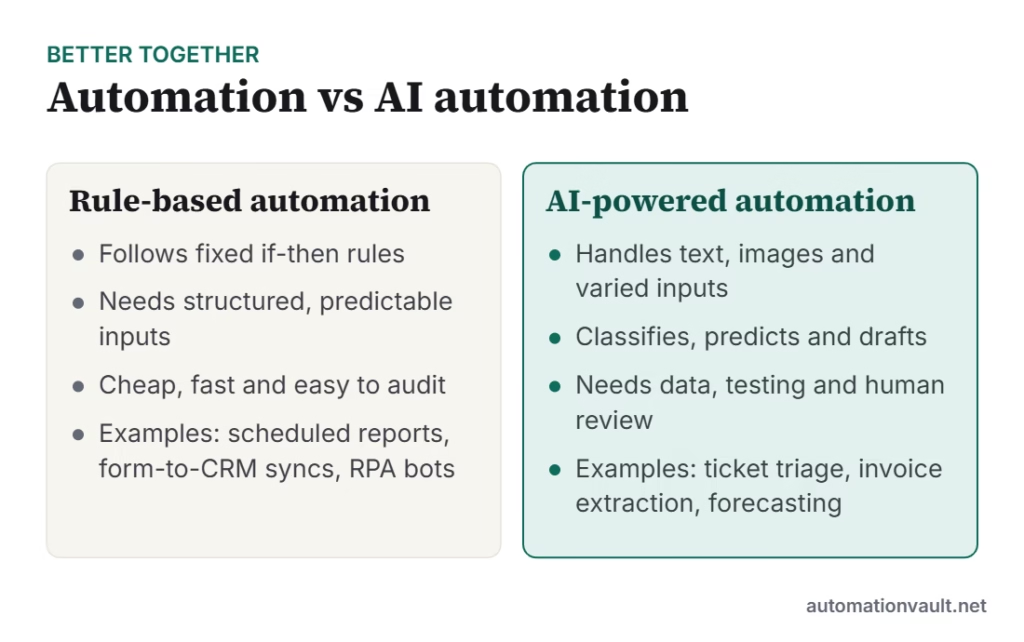
Classic automation breaks when inputs vary: a new invoice layout, a customer who writes in free text. AI models handle that variety. They extract fields from documents, route messages by intent, forecast demand and draft responses. The result is often called intelligent or cognitive automation; see cognitive RPA and intelligent document automation.
| Task | Best approach |
|---|---|
| Copy data between two systems on a schedule | Rule-based workflow or RPA |
| Read invoices from many suppliers | AI document extraction plus rules |
| Answer common customer questions | Chatbot grounded in your knowledge base |
| Decide credit limits | Predictive model with human sign-off |
Choosing what to automate
- High volume and frequent: saves the most time.
- Clear rules or consistent patterns.
- Digital inputs rather than paper or phone.
- Low-to-moderate cost if an error occurs, or a human check in place.
- Stable process that will not change next month.
A practical rollout
- List repetitive tasks with owners and time spent.
- Score them on volume, clarity and risk, then pick one to three.
- Build a pilot, test with real cases and measure time saved and errors.
- Document the process, add monitoring and name an owner.
- Expand to similar tasks and train staff on the new workflow.
Our RPA roadmap and RPA do’s and don’ts cover the practical details, and this comparison of automation tools helps you choose software.
Risks to manage
- Automating a broken process just makes mistakes faster, so fix it first.
- AI output can be wrong; keep review steps where errors are costly.
- Protect data and access; see RPA security.
- Plan for change management so people understand how roles will evolve.
Measuring results
Track hours saved, error rates, cycle time and customer or employee satisfaction before and after. Report the numbers to sponsors and use them to prioritise the next project. Small, well-measured wins build the case for larger investment.
Example: automating invoice handling end to end
A finance team receives supplier invoices by email in many layouts. An AI document step reads each invoice and extracts supplier, date, amounts and purchase order number. Rules then match it to the order and receipt. Clean matches are posted automatically by a software robot; mismatches go to a person with the problem highlighted. Approvals follow the usual limits. Typical results include faster processing and fewer keying errors, with staff time moving to exceptions and supplier queries. The same pattern applies to expense claims, onboarding forms and insurance claims.
Tool categories to know
| Category | What it does | Examples |
|---|---|---|
| Workflow and integration | Connects apps with triggers and actions | Zapier, Make, n8n, Power Automate |
| RPA | Mimics clicks and keystrokes in apps without APIs | UiPath, Automation Anywhere, Power Automate Desktop |
| AI services | Extracts, classifies, predicts and drafts | LLM APIs, document intelligence tools |
| Process mining | Finds bottlenecks in real process data | Celonis, UiPath Process Mining |
The right mix depends on your systems, skills and budget; start with the simplest tool that solves the problem.
Frequently asked questions
What is the difference between automation and AI?
Automation follows defined rules to perform tasks. AI learns patterns and can handle varied or unstructured inputs. They are often combined.
Which business processes should I automate first?
Frequent, rules-based, digital tasks with clear owners, such as data entry, report generation and routine approvals.
Does automation eliminate jobs?
It removes many repetitive tasks and changes roles. Organisations that retrain staff usually redeploy them to work that needs judgement and relationships.





Leave a Reply