RPA bots log in to systems, move data and sometimes handle payments, so a poorly secured bot is a privileged user that never sleeps. Security teams are right to ask hard questions about them. The good news is that the main risks are well understood, and a handful of controls covers most of them. This guide explains what to protect and how.
Key takeaways
- Treat every bot as a privileged identity: give it its own account, least privilege and a named owner.
- Never store passwords in scripts; use a credential vault.
- Log everything a bot does, and review the logs.
- Separate development, test and production, and review code before release.
- Include bots in your regular security, privacy and audit processes.
Why bots are a security concern
- Broad access: bots often need access to several systems at once.
- Stored credentials: passwords hard-coded in workflows can be copied or leaked.
- Sensitive data: bots may handle personal, financial or health data.
- Shared accounts: bots that use a person’s login make it impossible to tell who did what.
- Weak change control: an unreviewed change can send data to the wrong place.
Risks and the control for each
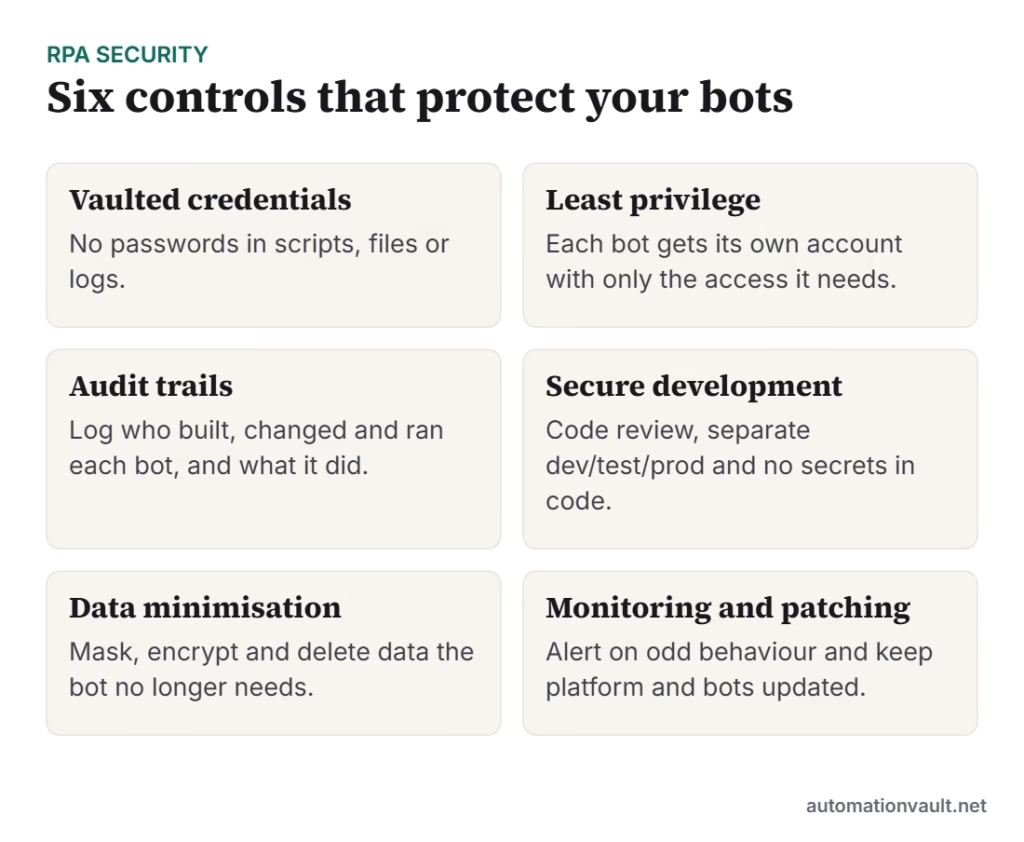
| Risk | Control |
|---|---|
| Passwords exposed in scripts or logs | Use a credential vault or secrets manager; rotate credentials automatically; mask values in logs |
| Bot has excessive access | Create a dedicated account per bot; grant only required permissions; review access regularly |
| Unauthorised changes to a bot | Role-based access, code review, version control and approvals before production releases |
| No accountability | Log bot runs and changes; keep audit trails; assign a named business and technical owner |
| Data leakage | Encrypt data in transit and at rest; avoid storing data in bot files; delete temporary files |
| Bot impersonation or hijack | Restrict where robots can run; use machine authentication; segment networks |
| Unpatched platform | Patch the RPA platform, robot machines and dependencies on a schedule |
| Insider misuse | Separate duties between developers, approvers and operators; monitor unusual activity |
Attended vs unattended bots
Attended bots run on a person’s desktop and act on their behalf, so they inherit that person’s access and should be treated as part of the user’s own session. Unattended bots run on servers or virtual machines with their own identity, which makes least privilege, vaulting and monitoring even more important. Lock screens, session recording and restricted machines help for unattended robots.
Compliance and privacy
If bots process personal data, privacy laws such as the GDPR or India’s Digital Personal Data Protection Act apply to that processing just as they do to people. Document what data each bot uses, why, and for how long; limit access; and make sure you can delete or correct data when required. For financial processes, keep the audit trail that auditors expect, including approvals and segregation of duties.
A practical checklist before go-live
- Is there a named owner and a documented purpose for the bot?
- Does it use a dedicated account with least privilege?
- Are all credentials stored in the vault, with none in code or logs?
- Has the workflow been reviewed and tested outside production?
- Are logs enabled, and does someone check them?
- Is there a plan for failures, including how to disable the bot quickly?
- Have privacy and security teams signed off?
Security works best when it is built into delivery from the start. See our RPA best practices, how to set up an automation CoE for governance, and Appian RPA and Tungsten RPA for examples of platform features.
Example: a secure invoice-posting bot
Here is how the controls fit together for a bot that posts supplier invoices into an accounting system:
- The bot runs as
svc-ap-bot, a dedicated account with permission to create invoices but not approve payments. - Its password lives in the credential vault and is rotated every 90 days by the platform.
- It runs on a locked-down virtual machine that only the RPA team can access.
- Every run writes a log with invoice numbers, never bank details, and logs are kept for the period required by your auditors.
- Changes go through code review, are tested against a test accounting system and are approved by the process owner before release.
- An alert goes to the support team if the bot fails or posts unusually many invoices.
This kind of separation (the bot can enter data but not approve payments) is the same segregation of duties you would apply to a person.
Questions auditors commonly ask
| Question | Evidence to keep |
|---|---|
| Who can change this bot? | Access lists and role assignments |
| What did the bot do on a given day? | Run logs and audit trail |
| How do you know changes were approved? | Change tickets and code review records |
| Where are credentials stored? | Vault configuration and rotation policy |
| What happens when it fails? | Incident procedure and past incidents |
Frequently asked questions
Are RPA bots secure?
They can be, when they use dedicated accounts, vaulted credentials, least-privilege access, logging and change control. Risks come mostly from how bots are built and managed, not from the technology itself.
Where should RPA credentials be stored?
In the RPA platform’s credential vault or your organisation’s secrets manager, never in the workflow, a spreadsheet or a log file.
Who should own a bot?
A named business owner who is accountable for the process, plus a technical owner who maintains it. Both should be recorded and reviewed regularly.



Leave a Reply