
Robotic process automation (RPA) can take hours of repetitive work off people’s desks, but many RPA programmes disappoint: bots that break every month, processes that should never have been automated, and savings that never show up. Most of these problems are avoidable. This guide brings together the do’s and don’ts of RPA, from choosing processes to designing, testing and running bots, so your automations keep delivering.
Key takeaways
- Choose processes that are rule-based, digital, stable and high-volume; use an API instead of a bot whenever one exists.
- Fix and document a process before automating it.
- Design bots in small, reusable components with clear error handling.
- Test with real data and edge cases, and plan for change from day one.
- Monitor every bot in production, and involve the people whose work changes.
The do’s of RPA
1. Choose the right processes
The best RPA candidates are repetitive, rule-based tasks with digital, structured inputs, such as copying data between systems, generating standard reports or processing standard forms. Work through these five questions for every idea:
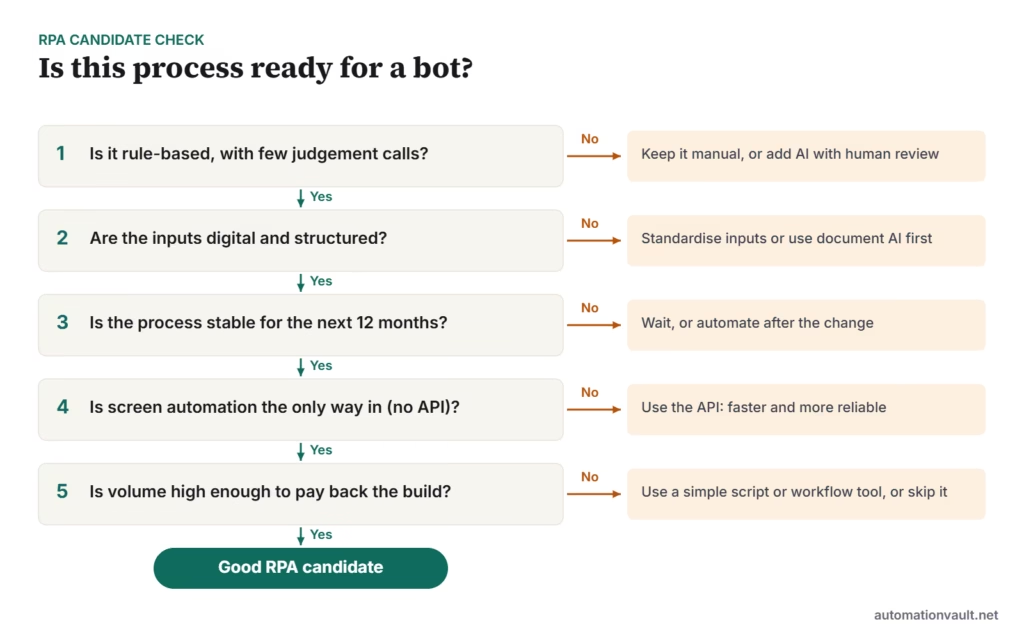
2. Understand and document the process
Before building anything, map each step, decision, system and exception with the people who do the work. Record volumes, handling times and error rates as a baseline. A clear process design document (PDD) prevents most misunderstandings between the business and developers.
3. Simplify before automating
Remove unnecessary approvals, duplicate data entry and inconsistent inputs first. Automating a messy process just makes the mess run faster.
4. Plan the roadmap and set realistic goals
Start with a few quick wins that prove value, then build a prioritised pipeline. Set targets you can measure, such as hours returned or error rates, rather than counting bots.
5. Pick tools that fit
Choose a platform based on your systems, skills and budget, not just features. Consider whether your applications have APIs, whether you need attended or unattended bots, and how the platform handles documents and AI. See UiPath competitors compared for an overview.
6. Design bots for reliability and reuse
- Break complex processes into small components, such as “log in”, “read invoice” and “post entry”, that can be tested and reused.
- Use stable selectors (element IDs, not screen coordinates or images).
- Separate configuration from code: file paths, URLs and thresholds belong in config, not hard-coded.
- Handle errors deliberately: distinguish business exceptions (data missing) from system errors (application down), and route each appropriately.
- Log clearly and take screenshots on failure.
- Store credentials securely in the platform’s vault, never in scripts.
7. Test thoroughly
Test with realistic data, including the awkward cases: missing fields, unusual formats, slow systems, and duplicate records. Run a parallel period where the bot and a person both process cases and compare the results before going fully live.
8. Monitor and improve continuously
Track success rates, exceptions and run times, and assign an owner to every bot. Review performance regularly; our guide to automation efficiency covers which metrics matter.
The don’ts of RPA
1. Don’t neglect change management
People worry that bots will replace them. Explain what’s changing and why, involve staff in design and testing, and retrain them for the work that remains. Programmes that skip this step meet resistance and quiet workarounds.
2. Don’t automate poorly defined or unstable processes
If people disagree about how the process works, or it changes every few months, the bot will fail. Stabilise first.
3. Don’t use RPA for everything
RPA is good at following rules on screens. It’s the wrong tool for judgement, unstructured documents or systems with good APIs. Combine it with integrations, document AI and people where needed; see RPA vs intelligent automation.
4. Don’t overlook security and compliance
Bots often have broad system access. Give each bot its own account with the least privileges it needs, protect credentials, log its actions, and make sure automated processing meets data protection rules.
5. Don’t “set and forget”
Application updates, new screens and policy changes break bots. Without monitoring and a support plan, failures go unnoticed until customers or auditors find them.
6. Don’t measure success by bot count
Ten bots that save little are worth less than one that removes a major manual process. Report outcomes: time, cost, quality and customer impact.
Quick checklist
| Stage | Do | Don’t |
|---|---|---|
| Selection | Score candidates on rules, inputs, stability, volume | Automate because someone asked loudest |
| Design | Document, simplify, then design in components | Hard-code values or credentials |
| Build & test | Test with real data and edge cases | Skip parallel runs |
| Run | Monitor, own and maintain each bot | Assume bots never break |
| People | Communicate early, retrain staff | Treat RPA as purely an IT project |
If you’re building an RPA programme across a whole organisation, read how to set up an automation Center of Excellence.
Frequently asked questions
What is the most common reason RPA projects fail?
Choosing the wrong processes and not planning for maintenance. Bots built on unstable or poorly understood processes break often, and the cost of fixing them eats the savings.
How long does it take to build an RPA bot?
Simple bots can take days; complex, multi-system processes can take several weeks including testing. Documentation and testing usually take longer than the build itself.
Should we use RPA if an API is available?
Usually not. APIs are faster, more reliable and easier to maintain. Use RPA when there’s no practical alternative, or as a temporary bridge.






Leave a Reply