RPA as a Service (RPAaaS) means getting robotic process automation through a cloud subscription instead of buying and running the software yourself. The vendor hosts the platform, you build and run bots on it, and you pay for what you use. It lowers the barrier to starting, which is why most RPA vendors now lead with cloud offerings. Here is what it includes, what it costs, and when it is the right choice.
Key takeaways
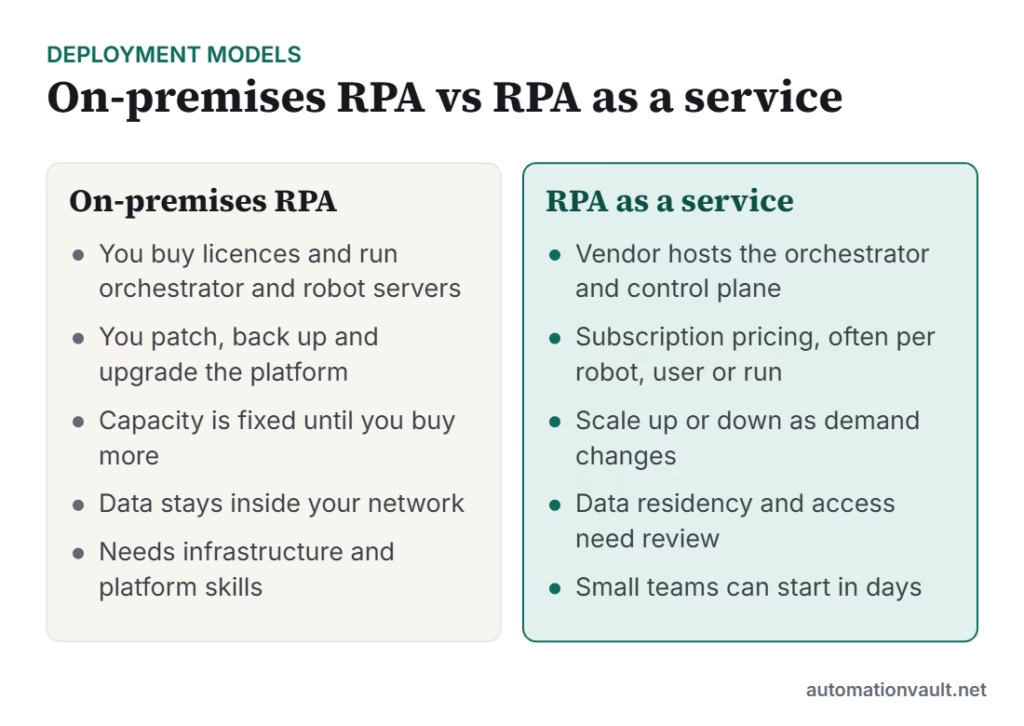
- RPAaaS usually means a vendor-hosted control plane (orchestration, monitoring, licensing), with robots running on your machines or in the vendor’s cloud.
- It removes most infrastructure work and lets you start small, but you still need to design, test and maintain automations.
- Check data residency, security certifications, pricing metrics and exit terms before signing.
- “RPA as a service” can also mean a managed service where a provider builds and runs bots for you.
Two meanings of “RPA as a service”
- Cloud-hosted RPA platform: the software is delivered as a subscription, such as UiPath Automation Cloud, Automation Anywhere’s cloud platform or Microsoft Power Automate. You build your own bots.
- Managed RPA service: a provider builds, runs and supports automations for a recurring fee. If you are interested in offering this, see how to start an RPA managed services business.
Benefits
- Faster start: no servers to buy, install or upgrade; teams can build a first bot within days.
- Lower upfront cost: operating expense instead of a large licence and infrastructure investment.
- Elastic capacity: add or remove robots as workloads change.
- Automatic updates: the vendor handles platform patches and new features.
- Built-in monitoring: dashboards, logs and licensing are included in the control plane.
Risks and trade-offs
| Area | What to check |
|---|---|
| Data and compliance | Where is data processed and stored? Does the vendor hold certifications such as ISO 27001 or SOC 2 that your auditors accept? |
| Pricing | Is it per robot, per user, per run or credit-based? Model realistic volumes, including peaks. |
| Lock-in | Can you export your workflows? What happens to automations if you leave? |
| Availability | What uptime does the vendor commit to, and what happens to scheduled bots in an outage? |
| Connectivity | Can the cloud platform reach systems behind your firewall, and how? |
How to choose
- Start with a process and a measurable goal, not a platform.
- Shortlist two or three vendors and run a proof of concept with real data; see UiPath competitors compared.
- Involve security and compliance teams early.
- Check that you can run robots on your own machines when data must stay in-house.
- Plan for governance as you scale; a Center of Excellence keeps cloud automation from becoming unmanaged.
RPA in the cloud does not remove the need for good design. The same principles apply, so review our RPA best practices before you build.
How cloud RPA pricing typically works
Vendors price cloud RPA in several ways, and the metric you choose changes the bill more than the headline price:
| Pricing metric | Example | Works best when |
|---|---|---|
| Per robot | A fee for each unattended or attended robot | You have a few steady, high-volume processes |
| Per user | A fee for each person who builds or runs automations | Many people build small, occasional flows |
| Per run or action | Charges based on executions or steps | Volumes are low or unpredictable |
| Credits or consumption | A pool of units spent on AI or document features | You use AI and document extraction heavily |
Ask vendors to price the same scenario, such as 5 robots, 3 builders and 50,000 runs a month, so you can compare like with like.
A simple security review for cloud RPA
- Confirm where the control plane and logs are hosted and whether you can choose a region.
- Check how credentials are stored; look for a vault and integration with your own secrets manager.
- Use single sign-on and role-based access for developers and operators.
- Make sure audit logs record who changed or ran each automation.
- Test how robots reach systems on your internal network, and who approves that access.
Done well, RPA as a service is a practical way for small and mid-sized teams to start automating without a large infrastructure project.
Who benefits most from RPA as a service
- Small and mid-sized businesses with no infrastructure team.
- Departments that want to start before central IT can provide servers.
- Organisations testing RPA who want to prove value before a large commitment.
- Companies with seasonal peaks that need to add capacity for a few weeks.
Frequently asked questions
Is RPA as a service cheaper than on-premises RPA?
Usually it costs less to start, because there is no infrastructure to buy. Over several years the total can be similar, so compare multi-year costs at your expected volumes.
Can cloud RPA automate desktop applications?
Yes. Robots typically run on your own Windows machines or virtual desktops and connect to the vendor’s cloud for orchestration, so they can drive local applications.
Is cloud RPA secure?
It can be, if the vendor has recognised security certifications, you control credentials and access properly and you review data residency. Always involve your security team.


Leave a Reply