Many companies buy RPA licences, build a handful of bots, and then struggle to keep them running. Bots break when applications change, the developer who built them moves on, and nobody owns the backlog. That gap is the opportunity for an RPA managed services business: you take responsibility for building, running and improving a client’s automations for a recurring fee. This guide walks through how to set one up, from choosing a niche to pricing and contracts.
Key takeaways
- The durable revenue is in running and improving bots, not just building them.
- Specialise early: one or two industries and one or two platforms.
- Price run services per bot or per process per month, with clear service levels.
- Your contract must cover access, credentials, data protection and what happens when the client’s applications change.
- Start with a small team and a few reference clients before scaling.
What an RPA managed service includes
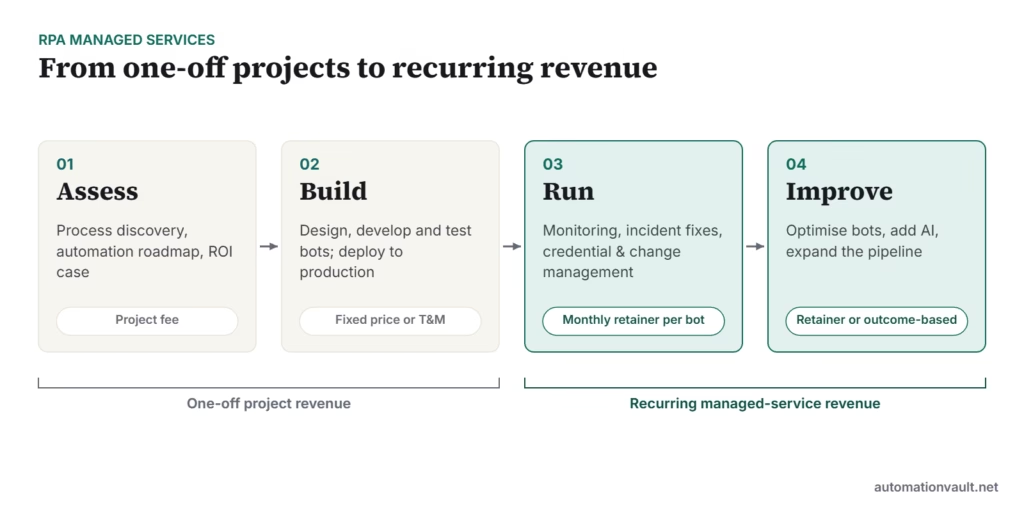
Most providers offer four stages. The first two are project work; the last two create recurring revenue and long-term client relationships.
Step 1: Pick a niche
Generalist RPA firms compete on price. Specialists win on credibility. Choose based on where you already have experience or contacts:
- By industry: healthcare revenue cycle, insurance claims, banking operations, logistics, accounting firms.
- By function: finance and accounting (invoice processing, reconciliations), HR onboarding, customer service.
- By client size: mid-sized businesses are often underserved; large consultancies focus on enterprises.
Step 2: Choose your platforms
Become proficient in one or two platforms rather than claiming all of them. Get certified, and join the vendor’s partner programme; partners often get training, sandbox licences and leads.
| Platform | Good fit for |
|---|---|
| UiPath | Enterprises and mid-market clients wanting broad features |
| Microsoft Power Automate | Clients already on Microsoft 365 |
| Automation Anywhere | Cloud-first enterprise clients |
| Open-source / Python (e.g. Robot Framework) | Cost-sensitive clients and technical teams |
For a fuller comparison, see UiPath competitors compared.
Step 3: Define service offerings
- Assessment: process discovery workshops, a scored pipeline of candidates and a business case.
- Implementation: design documents, development, testing and deployment.
- Managed run (hypercare and support): monitoring, incident fixes within agreed times, scheduled maintenance and change requests.
- Optimisation: improving success rates, adding document AI or AI agents, and expanding to new processes.
- CoE as a service: governance and standards for clients who want to build in-house. See how to set up an automation CoE.
Step 4: Set pricing models
| Model | How it works | Best for |
|---|---|---|
| Fixed-price project | Agreed price for a defined scope | Assessments and well-defined builds |
| Time and materials | Billed hours or days | Unclear scope, change requests |
| Per-bot or per-process retainer | Monthly fee covering monitoring and fixes | Run services |
| Outcome-based | Fee linked to transactions processed or hours saved | Mature, measurable processes |
Include the cost of the client’s automation licences in your proposals, even if they pay the vendor directly. Clients compare total cost, not just your fees.
Step 5: Build the team and tooling
- A solution architect who can design and review every build.
- Developers certified on your chosen platforms.
- A support analyst for monitoring and first-line fixes.
- A business analyst or consultant to run discovery and manage clients.
- Tooling: a ticketing system, a shared code repository, documentation templates and dashboards for each client.
Step 6: Get the contract right
- Service levels: response and resolution times by severity, and support hours.
- Responsibilities when the client changes an application the bot uses.
- Access, credentials and data protection, including obligations under the client’s data protection laws.
- Who owns the bot code and documentation if the contract ends.
- A clear change-request process and rates.
Step 7: Win the first clients
Offer a fixed-price assessment or a single pilot automation with a clear success metric. Document the results as a case study, and use it to win the next client. Content such as process guides and ROI calculators also brings in inbound leads.
Mistakes to avoid
- Selling bots without a support plan, then absorbing the cost of fixes.
- Promising savings without a measured baseline.
- Automating unstable processes that change every month.
- Ignoring APIs and integration tools when they are a better fit than screen automation.
Example service levels for a run contract
Clear severity levels stop arguments later. A simple starting point, to adjust to each client:
| Severity | Example | Response | Target fix |
|---|---|---|---|
| Critical | Payroll or payment bot down on a deadline day | 1 hour | Same business day |
| High | A production bot failing for all cases | 4 hours | Next business day |
| Medium | Some cases failing; workaround exists | 1 business day | Within 5 business days |
| Low | Cosmetic issue or minor improvement | 2 business days | Next scheduled release |
Report against these targets monthly, along with bot success rates and hours saved. A short, consistent report is one of the best ways to keep a managed-service client for years.
Frequently asked questions
How much does it cost to start an RPA managed services business?
You can start with a small team, developer licences (often free or discounted through partner programmes) and basic tooling. The main cost is skilled people.
Is RPA still a good business in 2026?
Demand has shifted from simple bots to automation that combines RPA, APIs and AI. Providers who offer that broader mix, and who run the automations reliably, are better placed. See is RPA dead?.
How do I price bot support?
A common approach is a monthly fee per bot or per process, tiered by complexity and service level, with change requests billed separately.


Leave a Reply