Marketing automation software sends the right message to the right person at the right time, based on what they do. It saves repetitive work, keeps follow-up consistent and links marketing to sales results. This guide explains the benefits, what to look for in a tool and how popular platforms compare. It replaces our earlier separate posts on the benefits of marketing automation and the best tools.
Key takeaways
- Automation handles email sequences, lead scoring, segmentation, social scheduling and reporting.
- The main benefits are time saved, more relevant messages and clearer attribution of revenue.
- Choose a tool based on your team size, channels, integrations and budget, not feature lists.
- Good data and a clear strategy matter more than the software.
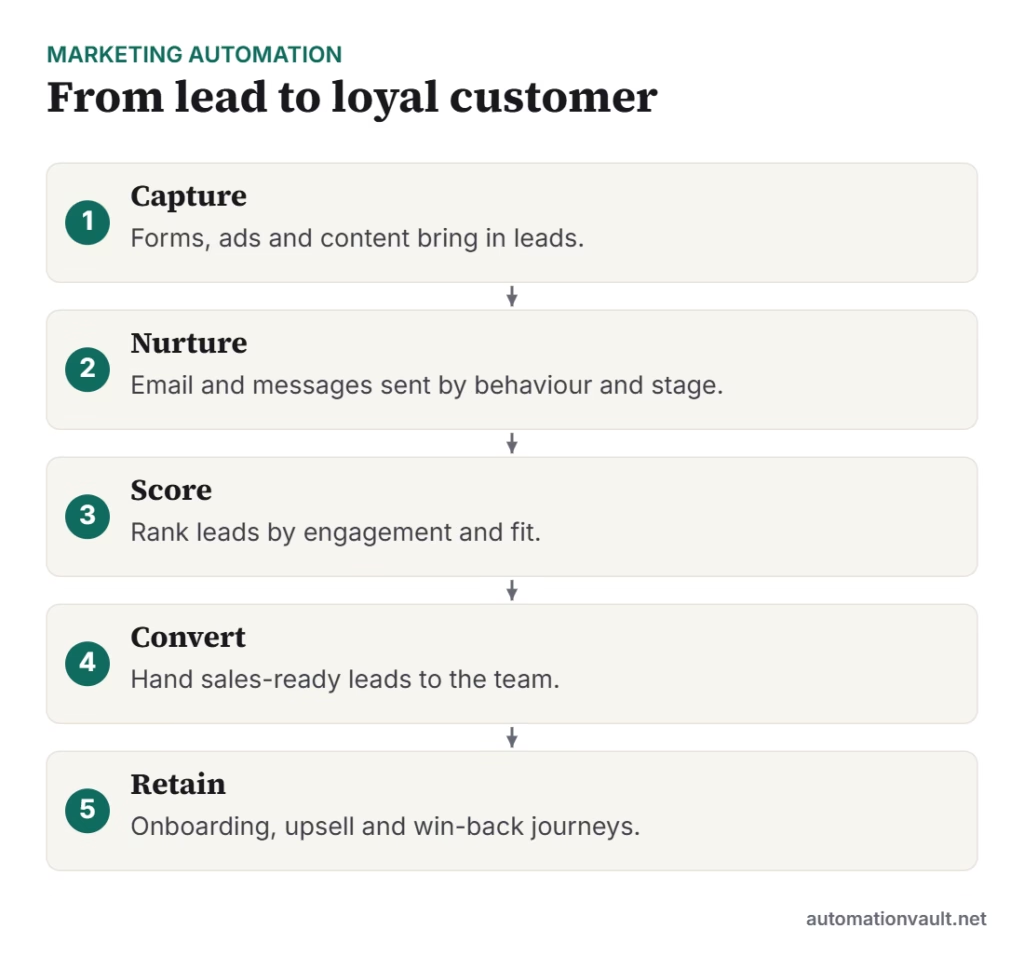
Benefits of marketing automation
- Efficiency: campaigns and follow-ups run without manual sending.
- Personalisation: content adapts to behaviour, interests and stage.
- Better lead handling: scoring helps sales focus on the most engaged prospects.
- Consistency: no lead is forgotten.
- Measurement: see which campaigns drive sign-ups and revenue.
What to look for in a tool
- Email and workflow builder that your team can use without developers.
- Segmentation and lead scoring.
- Integrations with your CRM, website, ad platforms and store.
- Reporting and attribution.
- Deliverability, consent and unsubscribe features for privacy law compliance.
- Pricing that scales with contacts or emails, and the cost of add-ons.
Popular platforms compared
Features and prices change often, so check each vendor’s current plans before deciding. The summary below reflects typical positioning.
| Tool | Best for | Notes |
|---|---|---|
| HubSpot | Teams wanting CRM plus marketing in one place | Broad suite, higher tiers can be costly |
| Mailchimp | Small businesses and newsletters | Easy to start, simpler automation |
| ActiveCampaign | Advanced email and customer journeys | Strong automation for the price |
| Brevo | Budget-conscious teams needing email and SMS | Flexible, sends-based pricing |
| Klaviyo | Ecommerce stores | Deep store integrations and segmentation |
| Zoho Campaigns / Marketing Hub | Teams already in the Zoho ecosystem | Good value inside Zoho |
| Marketo / Pardot (Salesforce) | Larger B2B organisations | Powerful but complex |
How to get started
- Define one goal, such as turning newsletter sign-ups into trial users.
- Map the customer journey and list the messages needed at each stage.
- Clean and segment your contact data.
- Build a simple welcome sequence first, then expand.
- Test subject lines and timing, and review results monthly.
Always collect consent and honour unsubscribe requests. Rules such as GDPR and CAN-SPAM apply depending on your audience.
Marketing automation also pairs with AI for content and prediction; see generative vs predictive AI and workflow automation tools.
Example: a simple welcome journey
A new subscriber downloads a guide. Day 0: a welcome email delivers the guide and sets expectations. Day 2: a short email shares the most useful related article. Day 5: if the subscriber clicked, a case study or demo invitation is sent; if not, a different topic is tried. A lead score rises with each click, and once it passes a threshold, sales receives a notification. This one workflow replaces a dozen manual follow-ups and is a good first build in any platform.
Common mistakes to avoid
- Buying a large platform before you have a content plan or enough contacts.
- Sending the same message to everyone instead of segmenting.
- Ignoring deliverability: authenticate your domain and keep lists clean.
- Automating without reviewing results, so weak emails run for months.
- Treating automation as a replacement for strategy and good content.
Choosing between tools: a quick checklist
- Does it integrate with the CRM and store you already use?
- Can your team build and edit workflows without developers?
- What are the real costs at double your current list size?
- Is data export easy if you want to switch later?
- What support and training come with the plan?
Run a trial with one real campaign before committing to an annual plan.
Frequently asked questions
What is marketing automation?
Software that automates repetitive marketing tasks such as email sequences, lead scoring and social scheduling, using customer behaviour to trigger actions.
Which marketing automation tool is best for small businesses?
Mailchimp, Brevo and ActiveCampaign are common choices. The best one depends on your channels, list size and budget.
Is marketing automation just email?
No. It also covers lead scoring, segmentation, landing pages, social posting, SMS and reporting, though email is the core for many teams.



Leave a Reply