Generative AI tools such as ChatGPT, Claude, Gemini and Copilot can draft, summarise, translate and analyse in seconds. Used well, they save hours every week. Used carelessly, they can leak confidential data, publish errors with total confidence, or create legal problems. Here are six dos and six don’ts for using generative AI at work, with practical examples for each.
Key takeaways
- Treat AI output as a first draft from a fast but unreliable assistant: useful, but always checked.
- Never put confidential, personal or client data into a tool your organisation hasn’t approved.
- Give the model your own source material for better, more accurate results.
- Keep people accountable for decisions, especially in legal, financial, medical and HR matters.
- Have a short written AI policy, even in a small business.
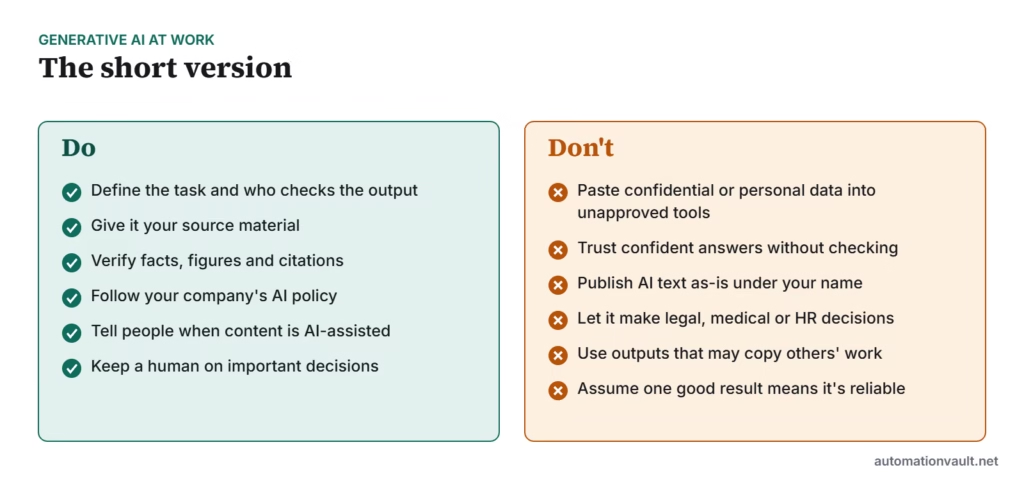
The dos
1. Define the task and the reviewer
Be specific about what you want, who it’s for and what “good” looks like, and decide upfront who checks the result. “Draft a polite reply declining this refund request, under 120 words, for me to review” is far safer than “reply to this customer”. Our guide to OpenAI’s six prompting strategies covers this in more depth.
2. Give it your source material
Models answer from patterns in their training data unless you give them something better. Paste the policy, the contract clause or the product sheet, and ask the model to answer only from it. Accuracy improves dramatically.
3. Verify facts, figures and citations
AI tools can produce convincing but false statements, invented references and wrong calculations. Check every number, name, date, quote and link against a trusted source before you use it.
4. Follow your organisation’s AI policy
Many companies specify which tools are approved, what data can be used and where AI-generated content needs a label. Business and enterprise versions of AI tools often include stronger data protections than free consumer versions; check the terms of the version you use.
5. Be transparent
Tell colleagues, clients or readers when AI played a significant role in creating content, especially in reports, published articles and customer communications. Some platforms and regulations now require disclosure in certain cases.
6. Keep a human on important decisions
Use AI to prepare options and drafts, but let a person decide anything that affects someone’s money, job, health or legal position.
The don’ts
1. Don’t share confidential or personal data with unapproved tools
Customer records, employee details, financial results before publication, source code and client documents should only go into tools your organisation has approved for that kind of data.
2. Don’t trust confidence
A model sounds equally sure when it is right and when it is wrong. Fluency is not evidence.
3. Don’t publish AI text unedited
Unedited AI text is often generic, repetitive and sometimes wrong. Readers and search engines value original insight and real experience; add your own examples, judgement and voice.
4. Don’t let it make regulated decisions
Hiring, credit, medical, legal and disciplinary decisions carry legal and ethical obligations. AI can support the people making them, not replace them.
5. Don’t ignore intellectual property
Be careful with outputs that closely resemble existing text, code, images or brands. Check licences for AI-generated code and images before commercial use.
6. Don’t assume one good result means it’s reliable
A prompt that works once may fail on the next input. If AI is part of a repeatable process, test it on a set of real examples and monitor it over time.
A simple AI policy template for small teams
| Area | Example rule |
|---|---|
| Approved tools | Use only the company’s business AI accounts for work |
| Data | No customer personal data, passwords or unreleased financials in prompts |
| Review | A named person checks AI-assisted content before it is sent or published |
| Disclosure | Label AI-generated images and significantly AI-written public content |
| Decisions | AI may draft and summarise; people make final decisions |
| Questions | Ask [named person] if unsure |
This template is a starting point, not legal advice. Requirements differ by country and industry.
To understand what these tools are and aren’t, read LLMs vs generative AI. For practical ideas, see ChatGPT use cases.
A two-minute review checklist
Before you send, publish or act on anything AI helped create, run through these questions:
- Facts: are names, dates, numbers and quotes correct, and can I point to a source for each?
- Links and references: does every cited source actually exist and say what the text claims?
- Fit: does it answer the real question, for this audience, in the right tone?
- Data: does it reveal anything confidential or personal that shouldn’t be there?
- Originality: does it add something of mine, such as an example, opinion or decision, rather than generic filler?
- Accountability: am I comfortable putting my name to it?
If any answer is “no” or “not sure”, fix it or leave it out. The time this takes is small compared with correcting a mistake after it reaches a customer.
Frequently asked questions
Is it safe to use ChatGPT at work?
It can be, if you use an approved account, keep confidential data out unless the tool is approved for it, and check outputs before relying on them.
Can AI-generated content rank in Google?
Google’s guidance focuses on whether content is helpful and original, not how it was produced. Thin, unedited AI content tends to perform poorly.
Do we need an AI policy in a small business?
A one-page policy covering approved tools, data, review and disclosure prevents most common problems and takes an hour to write.



Leave a Reply